Everybody Staze...

Nobody leavz...

  • Home
  • About Me
    • LinkedIn
    • Lab
  • Contact
  • Links
  • Reviews
  • Sitemap
  • Weather
You are here: Home / Archives for Reviews

The Hunger Games: Mockingjay – Part 1

2014/11/28 By staze

MockingjaySince I have previously reviewed both of the first two movies, I feel compelled to review the third movie, even though it’s part one of two. It will be a short review, however.

The movie takes off from pretty much the same moment Catching Fire left off, and we start to see District 13, and as those that have read the book know, it quickly becomes Katniss throwing a fit that Peeta wasn’t gotten out when the dome collapsed. It’s extremely sad everytime you see Plutarch Heavensbee (Philip Seymour Hoffman). Hopefully they won’t CG him into the second part of Mockingjay.

The movie stays relatively true to the book, and even includes a nicely done monologue of information that should have been in the earlier books: Why President Snow wears and smells of Roses.

All and All, I enjoyed the movie, and don’t want to give up too much incase people haven’t seen it, or read the book.

[xrr rating =4/5]
Filed Under: Reviews Tagged With: Catching Fire, Mockingjay Part 1, The Hunger Games

Arctic MX-4

2014/11/27 By staze

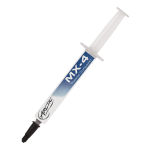
mx4_4g_g00_2I have a couple old Mac Pros sitting in the corner of my work office crunching numbers, and rendering randomly. Their CPU’s are always at 100%. I’ve had them apart half a dozen times to do upgrades, and I’ve never been very happy with the CPU temps. I’ve traditionally used Arctic Silver 5 (AS5) since it’s what I have a large tube of, and generally like. But, as I said, I’ve never liked the temp the Mac Pros run at, and because they’re at 100% all the time, the AS5 never has a real chance to “break in” (which requires many many hours of several thermal cycles). So, last week, I bought a tube of Arctic MX-4 (to be clear, Arctic Cooling (MX-4) is not the same company as Arctic Silver (AS5). The biggest advantage of the MX-4 being it has no break-in period.

Because the Mac Pros have Xeon 5300’s in them, I used the instructions on the Arctic Silver site for a “Horizontal Line“. After tinting the heat sink and heat spreader, I applied the compound and remounted the heat sinks. On power up, and after the machine had a chance to warm up, I am getting 42C and 44C on the two heat sinks at 100% load after 24 hours. On the Mac Pro I haven’t re-done yet, by contrast, I’m getting 44C and 50C. Mind you, those numbers are on a machine that I’ve never put a lot of effort into “breaking in”.

Of interest, I did notice that some of the AS5 on the machine I did looked like it had “broken down”. It was brownish, and had slumped quite a bit. Could be the AS5 I have is too old, or that because it never got a break-in period, it never settled into position, I really don’t know, but it was pretty gross to clean off the CPU heat spreader.

So, I’m happy, and hopefully those numbers will continue to hold. I will be re-doing the second Mac Pro next week. We’ll have to see if the same numbers show on that machine. Will definitely post those results as an update.

Filed Under: Reviews Tagged With: Arctic MX-4, Arctic Silver 5, Mac Pro

Raspberry Pi B+

2014/11/17 By staze

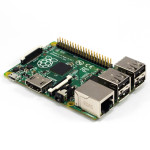
B_Pi_1_of_4_1024x1024After trying to control multimeters, programmable loads, power supply, etc, I decided I really needed some device to “run” my bench. Plus, I had a nifty USB GPS receiver (Delorme LT40) I picked up for $5 that I wanted to use, and seemingly only works in Linux anymore. Anyway, knowing all this, I decided it was time to finally buy a Raspberry Pi, and since it’d been a while from when I last looked at their offerings, I was excited to see the B+ model, which had 4 USB ports (perfect!).

I ordered the unit on Amazon (Canakit), as well a cheap $9 case… total cost, about $50 (ugh). Thankfully, I had a 16GB MicroSD card (which I installed NOOBS on). The Pi showed up with the power adapter (5V, 2A, MicroUSB), which is nice. The board looks very nicely done. Pretty amazing how much computer you get for no heatsink, and $50 (I remember my first PC was all of 133Mhz 486, and had a honkin’ heatsink). The case was relatively easy to install the board in, though the mounting holes on the board in relation to everything else made installing the screws a bit tricky). Anyway, install through NOOBS was easy, and after some downloading, everything was installed. The default install is a flavor of Debian, which is a little sad, since I would really prefer to use yum rather than apt-get, but c’est la vie.

Getting the GPS to work was simply installing gpsd and gpsd-clients, and modifying NTP to look at the GPSd handle for time info. The GPIB part of the equation was solved by Galvant GPIB to USB adapter I bought a while back ((which I still need to do a review on)). And Serial (RS232) I handled with a USB to RS232 adapter (for now). Theoretically I should be able to do this via the GPIO pins on the Raspberry Pi, but I haven’t gotten there yet. And of course the programmable load is just USB. Ideally, I hope to be able to program a routine to recondition a battery using multimeters over GPIB, my bench PSU over serial, and the Programmable load over USB to charge at a specific rate, discharge at a specific rate, and monitor/log everything while going it. The GPS is just an added bonus. =) Honestly, I’m pretty damn happy with the Pi. I hope they release one with USB3 at some point, then I can hook that to my Drobo and replace my Mac Mini with a couple very low power devices. =)

[xrr rating=5/5]

Filed Under: Reviews Tagged With: GPIB, GPS, Keithley 196, NTP, PSU, Raspberry Pi B+

« Previous Page
Next Page »

Weather

Categories / Archives

  • Apple
  • Coding
  • Electronics
  • Energy
  • Home Ownership
  • Miscellany
  • Politics
  • Prius
  • Sys Admin
  • Travel
  • Uncategorized
  • Work
  • April 2026
  • August 2025
  • April 2025
  • January 2024
  • February 2021
  • July 2020
  • January 2020
  • April 2019
  • March 2018
  • February 2018
  • June 2017
  • February 2017

Copyright © 2026 · Staze On Genesis Framework · WordPress · Log in