Everybody Staze...

Nobody leavz...

  • Home
  • About Me
    • LinkedIn
    • Lab
  • Contact
  • Links
  • Reviews
  • Sitemap
  • Weather
You are here: Home / Archives for Electronics

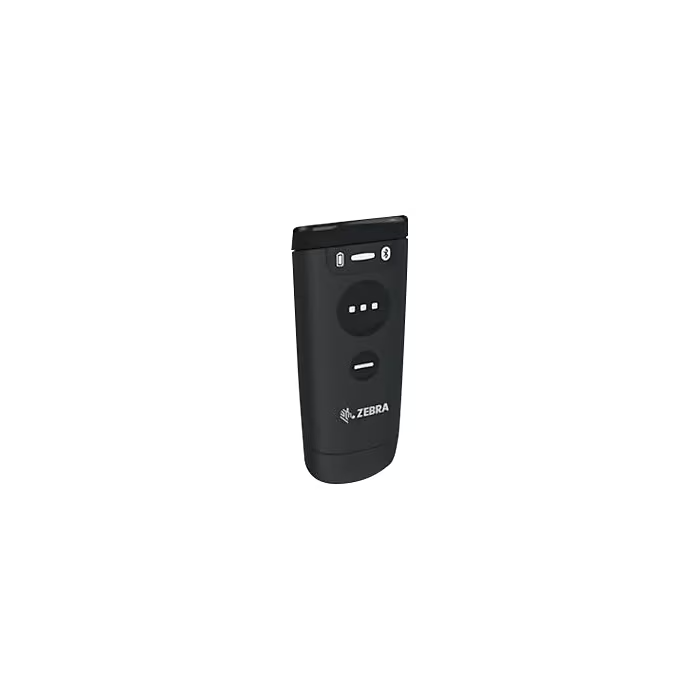
Zebra CS6080 Battery Recovery

2026/06/17 By staze Leave a Comment

I recently purchased a Zebra CS6080 barcode scanner off eBay for $50. Got it, and sadly it wouldn’t charge on the Qi pad I had. Fast flashing amber light. Looking at the manual, this means the battery had some issue. Checking the voltage with a multimeter, I got 0V. Guessing this thing just sat unused for a long period of time and the battery went flat (or rather, the Battery Management circuitry shut it off once it hit a theashold voltage).

Batteries for these things are silly expensive (which makes sense since the scanner itself is silly expensive). So, having nothing to lose, and the battery having markings for 4.4V charge voltage, I figured what the hell, and hooked it up to my bench PSU with 4.4V charging voltage, and 100mA charging current. The outer pins are marked + and -. I figured this might be possible because the manual indicated that if the battery won’t charge in the unit, you can throw it in the charging cradle (which has a dedicated battery charge slot).

Initially, got 0.00mA current, but I rigged up the connection to stay (with my magnifying lamp holding the probes in place), and walked away. About 30 mins later I circled back and it was taking a charge!

I left it that way for about 3 hours and it got up to about 3.9V. I stopped the charging and plugged it back into the scanner, and dropped the scanner on the Qi pad. Boom, it started charging! About 2-3 hours later, the light on the unit turned green (meaning fully charged)!

So, long story short, if you have one of these, might be worth trying to hook it up a PSU and give it a go. Just remember 4.4V and a relatively low current (in my case, I stuck to less than 0.1C, but you can probably go as high as 0.3C, I just didn’t want to overheat anything should it suddenly start conducting.
Filed Under: Electronics Tagged With: repair

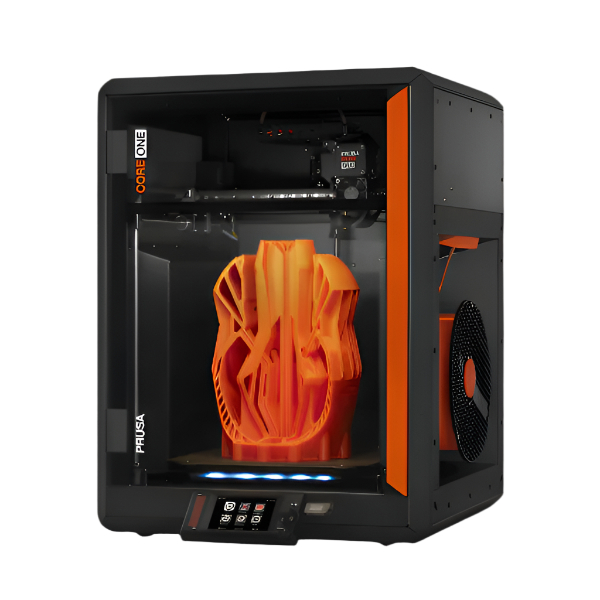
Prusa CORE One (Kit) Build and Review

2025/08/03 By staze Leave a Comment

I’ve owned a few 3d printers over the years. I started with a little Fabrikator Mini, then moved to a Cetus3D, then a Cetus2. The move from the Mini to the Cetus3D was fine, but had issues. I didn’t learn from that and ended up kickstarting the Cetus2, which was not great. Finally I was like “I’ve had it with these unsupported printers and companies, let’s buy a real printer”. I first was looking at a Bambu Lab A1 Mini, then the A1. They definitely looked appealing, but I’d seen some stories that made me wonder if they were going to do a Tiertime (let people buy the printer, then not offer support in the long run). Talking to a coworker, they said I should look at the X1 Carbon, which I said “I can’t afford” but then realized maybe I could. At that point, I thought “if I can afford an X1, maybe I can afford a Prusa…”. I knew the CORE One had been recently released, and I knew from years of following Prusa had offered years of “Upgrade your current printer to the new version” kits. Something I knew Bambu or others wouldn’t ever offer. So, realizing all that, and seeing the kit for the CORE One was available, I went ahead and ordered a Prusa CORE One kit back in February (2025). I thought mistakenly I’d have the printer quickly, but no, the kit didn’t show up until late May (which is good, honestly, as I was saved from the worst of the tariffs from the EU (which ended up being close to $140 invoice from Fedex a few weeks later that was the tariff as well as Fedex charges).

[Read more…]

Filed Under: Electronics, Reviews Tagged With: 3D Printer, Prusa

Repairing Yale YRD226 Motherboard sensor

2020/01/18 By staze 4 Comments

I recently purchased a Yale YRD226 off eBay for next to free ($35) that came with the zwave plus module. Was sold for parts/repair. Figured even if it didn’t work, it would be worth it just for the Z-wave module.

I got the unit and it appeared brand new, albeit terribly packaged. I powered it up, got it enrolled in my Z-wave mesh, and didn’t think anything of it trying in vane to calibrate the motor since it wasn’t in the door at the time.

Today, I installed it, and it would fail it’s handing (figuring out which side of a door it was installed on, which direction was lock vs unlock, etc). I THOUGHT it was locking and not realizing it was locking, but then I hit “lock” on my Hubitat, and it unlocked. Huh. I factory reset twice, and did the auto-handing via the keypad, and neither fixed it. Calling Yale, they said it’s likely a failed sensor, but I would need proof of purchase to get the back unit replaced. Now knowing where the sensor in question likely was, I took the unit to the bench.

So, under the microscope, I noticed just above the motor shaft there was a nice dent. Some sharp probes on my multimeter showed the track going to one of the latch IR sensors was busted. Sorry I don’t have pictures! I’ve yet to get a camera for my microscope.

After some scraping of the PCB solder mask and conformal coating, some 30AWG wire, and I was able to bridge the gap. Installing back on the door, it powered up and again had issues, but then I went in and did the auto-handing. It calibrated! Fixed!

So, long and short of it, likely previous owner either wasn’t careful and bashed the PCB with the latch “bar” missing the motor output, or it was damaged in shipping from the seller. But, it’s now fixed! If it breaks again, I’ll drill out the via on the board and solder directly to the IR sensor. Sadly, I didn’t have any good “glue” to hold the wire in place from vibration from the motor (and door opening/closing). May need to reevaluate that and throw some non-acidic silicone on there.

Kudos to the Yale support I talked to. While they did say it would void the warranty to repair the lock, I didn’t have a warranty to void, so them sharing that the sensor was on the “back side” piece of the lock was enough to look and find the damage! This lock is replacing a Schlage Z-Wave lock I’ve had issues with, but I will say, Schlage do a better job of protecting the PCB from accidents.

Filed Under: Electronics

Next Page »

Weather

Categories / Archives

  • Apple
  • Coding
  • Electronics
  • Energy
  • Home Ownership
  • Miscellany
  • Politics
  • Prius
  • Sys Admin
  • Travel
  • Uncategorized
  • Work
  • June 2026
  • April 2026
  • August 2025
  • April 2025
  • January 2024
  • February 2021
  • July 2020
  • January 2020
  • April 2019
  • March 2018
  • February 2018
  • June 2017

Copyright © 2026 · Staze On Genesis Framework · WordPress · Log in