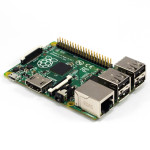
 After trying to control multimeters, programmable loads, power supply, etc, I decided I really needed some device to “run” my bench. Plus, I had a nifty USB GPS receiver (Delorme LT40) I picked up for $5 that I wanted to use, and seemingly only works in Linux anymore. Anyway, knowing all this, I decided it was time to finally buy a Raspberry Pi, and since it’d been a while from when I last looked at their offerings, I was excited to see the B+ model, which had 4 USB ports (perfect!).
I ordered the unit on Amazon (Canakit), as well a cheap $9 case… total cost, about $50 (ugh). Thankfully, I had a 16GB MicroSD card (which I installed NOOBS on). The Pi showed up with the power adapter (5V, 2A, MicroUSB), which is nice. The board looks very nicely done. Pretty amazing how much computer you get for no heatsink, and $50 (I remember my first PC was all of 133Mhz 486, and had a honkin’ heatsink). The case was relatively easy to install the board in, though the mounting holes on the board in relation to everything else made installing the screws a bit tricky). Anyway, install through NOOBS was easy, and after some downloading, everything was installed. The default install is a flavor of Debian, which is a little sad, since I would really prefer to use yum rather than apt-get, but c’est la vie.
Getting the GPS to work was simply installing gpsd and gpsd-clients, and modifying NTP to look at the GPSd handle for time info. The GPIB part of the equation was solved by Galvant GPIB to USB adapter I bought a while back ((which I still need to do a review on)). And Serial (RS232) I handled with a USB to RS232 adapter (for now). Theoretically I should be able to do this via the GPIO pins on the Raspberry Pi, but I haven’t gotten there yet. And of course the programmable load is just USB. Ideally, I hope to be able to program a routine to recondition a battery using multimeters over GPIB, my bench PSU over serial, and the Programmable load over USB to charge at a specific rate, discharge at a specific rate, and monitor/log everything while going it. The GPS is just an added bonus. =) Honestly, I’m pretty damn happy with the Pi. I hope they release one with USB3 at some point, then I can hook that to my Drobo and replace my Mac Mini with a couple very low power devices. =)
[xrr rating=5/5]