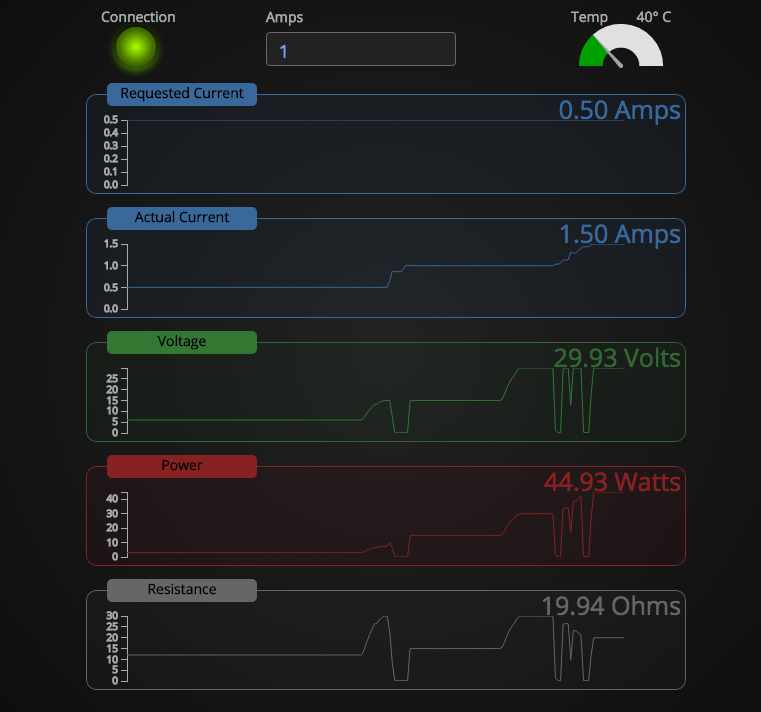
 Now that I have the Raspberry Pi, and the Re:load Pro, I wanted some way to monitor things. Luckily, someone else did the work! While I have no problem running it on the Mac, that defeats my purpose of the Raspberry Pi. So, I grabbed the source, and worked on installing it on there.
Here’s the long and short of it.
You need to download and compile node.js from source. This will take a LONG friggin’ time, so go have dinner. Watch a movie. Something. For me, it took about 2 hours to compile. After that, you need to install optipng, and libjpeg-progs (sudo apt-get install optipng libjpeg-progs). Finally, you have to install node-serialport (sudo npm install serialport). After that, you can install rlpmon by cd’ing into the directory, and running “npm install” (basically, follow the directions on Dean’s github page for the software.
After that, you’re good to go. Enjoy!
 After trying to control multimeters, programmable loads, power supply, etc, I decided I really needed some device to “run” my bench. Plus, I had a nifty USB GPS receiver (Delorme LT40) I picked up for $5 that I wanted to use, and seemingly only works in Linux anymore. Anyway, knowing all this, I decided it was time to finally buy a Raspberry Pi, and since it’d been a while from when I last looked at their offerings, I was excited to see the B+ model, which had 4 USB ports (perfect!).