 Because I couldn’t find any info on this myself (and therefore my Partkeepr install has been broken since updating to PHP 5.6), and it took the developer of Partkeepr some thought on how to Google for it himself, I thought I would post something quick on Partkeepr and PHP 5.6. Basically, it works, but only if you don’t have a couple options set with PHP 5.6’s Zend OPCache (the built-in OPCache in 5.6, which largely deprecated APC). There are two options for opcache that completely break several frameworks, such as Doctrine, which Partkeepr uses extensively. The options are:
opcache.save_comments
opcache.load_comments
If either of these options is set to “0”, things break. And of course, if you read the notes on “opcache.save_comments” it mentioned breaking Doctrine. So, make sure they’re set to “1” if you’re using any of those frameworks, and especially if you’re using Partkeepr. I banged my head against this for days.
The developer of Partkeepr, however, is going to have a runtime check in a new version that makes sure those two options are set properly, otherwise have Partkeepr throw an error. Here’s the initial bug report of mine. Hopefully this post will help someone, and save them some hair being torn out. =)
UPDATE: I was able to just enable opcache.save_comments and load_comments for just my partkeepr domain by setting:
php_admin_flag opcache.save_comments 1
php_admin_flag opcache.load_comments 1
In the VHOST configuration for apache. This lets me leave them both as 0 for all my other sites, thereby gaining the reduced cached sizes. =) Good luck!
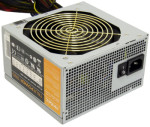 Couple weeks back I got a request to repair a friends computer. It would lock up, not reboot, etc. The computer was largely for gaming, so after an initial software scan, I figured it must be heat. Opening the machine, I noticed none of the case fans are running. I had initially done the build on the machine, and new all the case fans were wired to the fan power “bus” provided by the power supply (which handled speeding/slowing the fans based on case temp), an Antec TruePower Trio TP3-550. Asking the friend, he mentioned that he had noticed the LEDs on the front case fan had went out a month or two ago. Hmm. Checking the voltage on that fan bus showed only 2V (not nearly enough to run a 12V 120mm fan). The PSU’s fan was also not running. Crap, that was probably overheating the PSU, and causing the instability.
 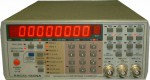 Like nearly ever other Racal-Dana 199x owner, I have the mushy/lifeless buttons, so this last week (during vacation) I decided to do the replacement work. It involved unsoldering all the stock buttons (34 of them). Thankfully I have a