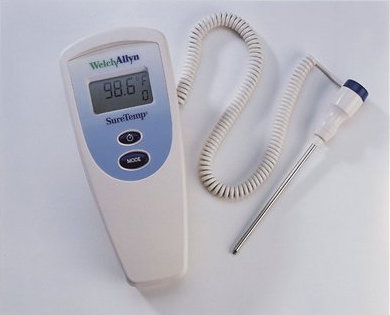
 When my son was “on the way” we went looking to buy a thermometer since we knew we’d need one. Being a geek, I looked on eBay and found a hospital/clinic grade WelchAllyn SureTemp. It was an older model, but seemed to be in good shape, and I got it for pretty cheap (like $30). It came with the Oral/Aux probe, but didn’t come with the wall holder, which is a slight issue, as I’ll find.
The unit, by and large, works great. It was pretty grimy when I got it, but it cleaned up with some IPA and cotton swabs. The problem was, since I was using it for my baby (then toddler) son, I wanted to use the under-arm mode. It defaults to the Oral mode, and you have to hold the mode button for 2 seconds to switch it. This can be changed if you read the Service Manual by placing the unit in the wall holder, and holding the mode button down while removing the probe. I don’t have the wall holder. Damn. A bit more reading in the Service Manual showed there is a magnetic read switch on the PCB that’s being toggled when placed in the wall holder. So, I grabbed a largish magnet (circular) ((the type you see a hook attached to. Think I got it at Harbor Freight)), and placed it on the front of the unit while holding Mode, and removing the probe. Viola! It went into Service, and I was able to change the default to ALY (Auxiliary) mode by default. Yay! Good luck (if you have one of these, and this behavior annoys you).
 Okay, last PSU “repair”, I promise (well, until I get another). The bottom of my pile had a Corsair CX600 on it that had shorted out, and nearly fused it’s CPU 12V connection to the motherboard it was attached to. I managed to get it off, but testing the power supply resulted in no output except the +5VSB line. I contacted Corsair, and they quickly set up an RMA for me. I provided them with pictures of the connector, cable, serial number, and picture of my Dr. Power II screen showing no output. I shipped the unit USPS on Saturday, it got there on Monday, they shipped out a replacement that same day, and I had the brand new unit in hand on Wednesday. This was obviously all West coast, but still. I’m pretty amazed by their turn around. Hats off to Corsair.
  Power supply repair number two, for me, is repairing a unit I’ve had for years, and “works”, but frequently, it will power up the the computer, then almost immediately power it back off, and require flipping the switch on the power supply off and on to get it back “working”. This behavior is indicative of either the Over or Under Voltage/Current latch kicking in (this could be semi-confirmed by unplugging fans, or hard drives from the power supply, and it would start up much more reliably). If the unit did successfully power up, it would run the computer with no problems for weeks/months at a time (I had the unit powering an IPTV box for 6 months previous to teardown for repair). Testing with my