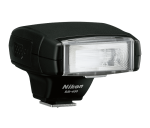
 I recently found, and purchased, a broken Nikon SB-400 Speedlight off eBay for $35. Knowing I’d been looking for one for years, I figured worst case the tube was bad, and I’d be able to replace that for less than $15. The seller was great to work with, and got the unit shipped out immediately. The unit arrived, and I had a small hope it just worked, since the seller indicated they didn’t have a camera to actually test it with (and interestingly, the SB-400 has no “test” button (you can’t press the ready light and get it to fire like pretty much every other camera flash that has ever existed)). But, sadly, it didn’t work. Okay then, time to take her apart (WARNING: Camera flashes contain a high voltage (and relatively high capacity) capacitor. In most cases, these can hurt you. It SOME cases, they could probably kill you. If you don’t know how to properly discharge these capacitors, DO NOT attempt flash repairs yourself!).
The unit has (I know this in hind sight) 3 screws that hold it together. Two are obvious on the bottom side by the flash head itself, and one is in the battery compartment, under a small stick on plastic “cover”. After these three are removed, the flash opens relatively easily, and you are greeted by the top board (which houses the micro controller) the capacitor, and the flash head. In my case, I discharged the capacitor using a multimeter with a “Lo-Z” adapter on it (Fluke calls theses a Stray Voltage Adapter, but basically, it’s a MOV in a box that makes the multimeter have about a 3k ohm input impedance, so discharging the capacitor and watching it discharge is easy).
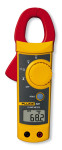 I recently, mistakenly, purchased a Fluke 322 off eBay for far more than I should have paid (paid about $35 for a broken one). I thought it would be an easy repair, but sadly, the issue was that the case was broken (guessing it got dropped from some height, or was partially crushed). The self-taping screws all screwed into the plastic casing front, and several of those threaded lugs were broken, so the case wasn’t being held together fully, which results in the contacts from the rotating switch not making contact enough to turn the multimeter on.
 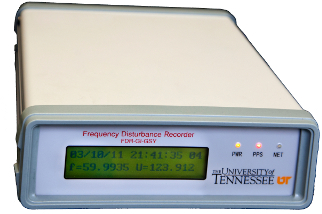 Being a data nut, a relatively recent electronics enthusiast, and now a burgeoning “time nut”, there was a thread on the timenuts email list on monitoring the