Everybody Staze...

Nobody leavz...

  • Home
  • About Me
    • LinkedIn
    • Lab
  • Contact
  • Links
  • Reviews
  • Sitemap
  • Weather

Asus RT-N16

2014/01/29 By staze

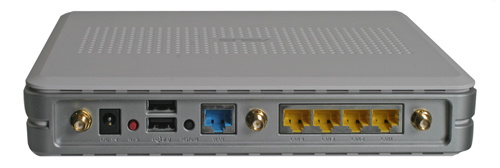
RT-N16 Rear (No Antennas)Years ago I moved my cable modem down to my garage to get it closer to the coax (CATV) splitter. The cable modem then had CAT5 running up to the office where my Airport Extreme (which provides routing) lives. This meant anything that wanted to be on the network had to either be in proximity to the office, or be on wireless. This kind of sucked for a DDR (Dance Dance Revolution) computer I have in the garage, and the hope of moving my electronics lab out to the shed. So, I’ve been planning to install a router in the garage next to the cable modem for almost as long as the cable modem has been down there. So, to that end, I purchased one of the most capable home routers in existence, the Asus RT-N16. Got it off eBay for about half price, but I really didn’t want to spend much since I don’t need the wireless capability (I have a very functional Airport Extreme). All I really wanted was a decent CPU speed, ram/flash size, and a GigE switch… which all basically means being able to run Tomato, DD-WRT, etc (which the RT-N16 will do. More later).

The router itself is pretty reasonably sized, not taking up much more space than a 5.25 external enclosure. On the back are the antenna jacks, 4 GigE switch ports, the WAN port (also GigE), USB2.0 (for a printer, or external HD), and DC jack. CPU, RAM, and Flash info can be found here. Basically though, short of the Asus RT-N66U, the RT-N16 is pretty darn near the top of the home router capability chart. It won’t route at gigabit speeds (seems to be around 150Mbit/sec), but I don’t have that kind of bandwidth at home anyway. Plus, the RT-N66U goes for at least twice as much new, and on eBay.

Anyway, after receiving the unit, was the most complicated and time consuming part of my experience: deciding which firmware to use. The stock Asus firmware is fine for most people but I really had 4 main requirements:

  1. IPv6 Support (Native from ISP)
  2. Built in DNS Server (for internal DNS)
  3. UPNP/NAT-PMP support
  4. Non-sucky NAT

So off the bat, DD-WRT and Tomato support built in DNS, the native firmware does not. There is an alternate to the native firmware nicknamed Merlin, but it only did some things, but not others. DD-WRT doesn’t support native IPv6, it only does 6to4 tunneling. All the firmwares do UPNP, but only Tomato does NAT-PMP. So it was looking more and more like Tomato was the answer. The biggest issue being that Tomato seems relatively dead, major code wise, with only people like Toastman doing mods. But, that’s good enough for me. I grabbed the latest Tomato from Toastman and loaded it up (which requires first loading dd-wrt, then Tomato due to some weird size or packaging issues… I’m not sure). Loading the firmware was really the only way I was going to find out if it met the last requirement. And by that, I really mean the ability for me to use things like Apple Remote Desktop from home, and have ports open appropriately. m0n0wall does not do this reliably. The biggest issue is that I had to do a lot of the configuration and testing without it being my primary router (I didn’t want to take my network down for install/testing). So, in short, I ended up moving back and forth between Tomato, DD-WRT, Merlin, and the stock Asus firmware at least half a dozen times before putting the whole thing down, forgetting, and then remembering I’d decided on Tomato at the end.

Then yesterday, I put Tomato back on the RT-N16, and configured it for IPv6, Internal DNS, DDNS, etc and installing it. All told, my network was down less than 5 minutes, and it seems to be working great. It fit very well on my garage “network” pegboard with some zip ties, and it just seems to work. I, of course, had to tell the Airport Extreme it was just a Bridge at that point, but that was quick and painless (though it does take a very long time to reboot for some reason). All functionality that I required seems to be working, including IPv6 (though for Comcast, you want to set it to DHCPv6 with Prefix delegation and leave the rest at defaults).

All and all, I’ve very happy. I will need to rearrange the pegboard soon as I can’t see the lights on the router at all, but for now, it works!

[xrr rating=5/5]

Filed Under: Reviews Tagged With: Asus, Router, RT-N16

The Hunger Games: Catching Fire

2014/01/20 By staze

catching_fire_ka_300dpiI recently saw The Hunger Games: Catching Fire and having read the books, I can say that the movie both kept very closely to the book, as well as provided a nice improvement to the first movie, which seemed very low budget. The second movie starts very shortly after the first one ended, and picks up with very little attempt to re-introduce viewers to the characters, or the plot. Viewers are obviously expected to know what is going on before starting this movie, even though about a year and a half has passed between the first movie, and the second.

For more info on what the plot is, please see my review of the first movie here. So after the first movie/book, and our main characters survive, they go on to live in nice houses back in their district. The idea being they are being rewarded by the Capital for “winning” the games. The movie basically starts at this point, just before they are about to go on their “tour” of the country talking about how great the games were, etc. And they also get to see the riots that are breaking out in the country.

Anyway, it’s hard not to just detail the whole movie. I can say, however, that the movie follows the book very well this time around, and the production quality was very good.

Anyway, recommended, and I have very little negative to say with the movie.

[xrr rating=5/5]

Filed Under: Reviews Tagged With: The Hunger Games

The Legend of Zelda: A Link Between Worlds

2014/01/13 By staze

A-Link-Between-Worlds-Box-ArtFor years, I resisted buying a Nintendo 3DS because I thought they were a bit gimmicky, and there weren’t really any games I wanted to play. Nintendo changed that equation when they announced, then released A Link Between Worlds, which takes place in the same world as A Link to the Past, what may be my favorite game of all time, but certainly my favorite Zelda game. A Link Between Worlds is certainly a better game than many of the recent Zelda incarnations (not including remakes) (Skyward Sword, Twilight Princess, Spirit Tracks, etc), and may be the finest Nintendo first party title to come along since before the Wii was introduced ((at which point I would say the Metroid Prime‘s for Gamecube, and Wind Waker)).

The game, as many reviews point out, takes place several generations after A Link to the Past, A Link Between Worlds has yet another Link, and Zelda (see Zelda Timeline). And much like every other Zelda game, Link starts out unknown that he’s important, and is simply a Blacksmith’s assistant. He’s off to deliver a sword to a customer, when “evil” happens, and suddenly you’re “Link the Hero”. After this point, the game plays VERY much like A Link to the Past, with the addition of the ability to merge into walls and move along them (which is an ability you get in the first couple hours of the game). This mechanic, along with the game being 3D, are not the typical “gimmicks” that Nintendo pulls with their first party games. The last few Zelda games, wether for Wii, or DS, just seemed gimmicky with their “Skyward Sword” move, or yelling/blowing into the DS Microphone (which, I’d hate to have to do if I was on a Subway/Bus). Link Between Worlds had none of this. While there were certainly some points that could have been more “logical” with 3D, it was never needed. The game didn’t feel gimmicky at all, and was very well done. The story was easy to follow (though, there was one piece that I missed (or wasn’t there) that explained part of what was happening). But this turned out to be minor, and could be due to me not paying attention.

Gameplay, all and all, was excellent. Story was excellent. Music Score was amazing. Rather than just remaking Link to the Past they truly made a great sequel (of sorts) that does not disappoint, nor ruin the wonderful legacy that Link to the Past has to this day. My only, ONLY, complaint was the game was a bit short. I collected all 100 of the Maimai’s, and the game still only took maybe 15-20 hours.

[xrr rating=5/5]

Filed Under: Reviews Tagged With: 3DS, Nintendo, Zelda

« Previous Page
Next Page »

Weather

Categories / Archives

  • Apple
  • Coding
  • Electronics
  • Energy
  • Home Ownership
  • Miscellany
  • Politics
  • Prius
  • Sys Admin
  • Travel
  • Uncategorized
  • Work
  • April 2026
  • August 2025
  • April 2025
  • January 2024
  • February 2021
  • July 2020
  • January 2020
  • April 2019
  • March 2018
  • February 2018
  • June 2017
  • February 2017

Copyright © 2026 · Staze On Genesis Framework · WordPress · Log in