Everybody Staze...

Nobody leavz...

  • Home
  • About Me
    • LinkedIn
    • Lab
  • Contact
  • Links
  • Reviews
  • Sitemap
  • Weather
You are here: Home / Archives for RT-N16

Repair of Asus RT-N16

2014/11/24 By staze

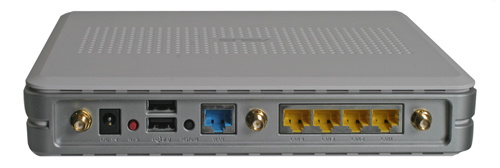
RT-N16 Rear (No Antennas)Late last night, my router went down. Checking it, I saw that the lights were all off. Huh. So, I unplugged and replugged it, and it came back up. Figuring it was a glitch, I went back to bed, and thought nothing of it. This morning, I found it was off again, and re-plugging it would do nothing. Crap.

So, I pulled it off the wall, and opened it up. Hey look, a bad capacitor. It’s labeled as a 680uF 16V cap, with a nice bulged top. After finding a replacement in my capacitor stash, I went about removing the old one… which was, a pain. Mainly because it’s on a huge ground plane, so heating the leads enough to get it removed was a challenge. Even my FR-300 desoldering gun took a bit of work to get things hot enough to melt. But, after about 5 minutes of working on it, I got the old one out, and the new one in. The new one is a bit taller, but it does fit ((And yes, I’m okay with a 16V capacitor in this case since the power supply is 12V (meaning a 75% derating) and the whole thing lives in my garage which is never above 20C. Yes, I know it’s above the minimum 70% derating, but not by much, and I didn’t have a 25V that would fit.)) ((Also note: Asus, at least on this board, paints their capacitor markings backward. Where normally the negative capacitor lead would go in the solid white marked hole, it is actually the positive as can be seen for all the other caps on the board. Why Asus does this, I have NO idea.)).
[Read more…]

Filed Under: Electronics Tagged With: Asus, Capacitors, repair, RT-N16

Asus RT-N16

2014/01/29 By staze

RT-N16 Rear (No Antennas)Years ago I moved my cable modem down to my garage to get it closer to the coax (CATV) splitter. The cable modem then had CAT5 running up to the office where my Airport Extreme (which provides routing) lives. This meant anything that wanted to be on the network had to either be in proximity to the office, or be on wireless. This kind of sucked for a DDR (Dance Dance Revolution) computer I have in the garage, and the hope of moving my electronics lab out to the shed. So, I’ve been planning to install a router in the garage next to the cable modem for almost as long as the cable modem has been down there. So, to that end, I purchased one of the most capable home routers in existence, the Asus RT-N16. Got it off eBay for about half price, but I really didn’t want to spend much since I don’t need the wireless capability (I have a very functional Airport Extreme). All I really wanted was a decent CPU speed, ram/flash size, and a GigE switch… which all basically means being able to run Tomato, DD-WRT, etc (which the RT-N16 will do. More later).

The router itself is pretty reasonably sized, not taking up much more space than a 5.25 external enclosure. On the back are the antenna jacks, 4 GigE switch ports, the WAN port (also GigE), USB2.0 (for a printer, or external HD), and DC jack. CPU, RAM, and Flash info can be found here. Basically though, short of the Asus RT-N66U, the RT-N16 is pretty darn near the top of the home router capability chart. It won’t route at gigabit speeds (seems to be around 150Mbit/sec), but I don’t have that kind of bandwidth at home anyway. Plus, the RT-N66U goes for at least twice as much new, and on eBay.

Anyway, after receiving the unit, was the most complicated and time consuming part of my experience: deciding which firmware to use. The stock Asus firmware is fine for most people but I really had 4 main requirements:

  1. IPv6 Support (Native from ISP)
  2. Built in DNS Server (for internal DNS)
  3. UPNP/NAT-PMP support
  4. Non-sucky NAT

So off the bat, DD-WRT and Tomato support built in DNS, the native firmware does not. There is an alternate to the native firmware nicknamed Merlin, but it only did some things, but not others. DD-WRT doesn’t support native IPv6, it only does 6to4 tunneling. All the firmwares do UPNP, but only Tomato does NAT-PMP. So it was looking more and more like Tomato was the answer. The biggest issue being that Tomato seems relatively dead, major code wise, with only people like Toastman doing mods. But, that’s good enough for me. I grabbed the latest Tomato from Toastman and loaded it up (which requires first loading dd-wrt, then Tomato due to some weird size or packaging issues… I’m not sure). Loading the firmware was really the only way I was going to find out if it met the last requirement. And by that, I really mean the ability for me to use things like Apple Remote Desktop from home, and have ports open appropriately. m0n0wall does not do this reliably. The biggest issue is that I had to do a lot of the configuration and testing without it being my primary router (I didn’t want to take my network down for install/testing). So, in short, I ended up moving back and forth between Tomato, DD-WRT, Merlin, and the stock Asus firmware at least half a dozen times before putting the whole thing down, forgetting, and then remembering I’d decided on Tomato at the end.

Then yesterday, I put Tomato back on the RT-N16, and configured it for IPv6, Internal DNS, DDNS, etc and installing it. All told, my network was down less than 5 minutes, and it seems to be working great. It fit very well on my garage “network” pegboard with some zip ties, and it just seems to work. I, of course, had to tell the Airport Extreme it was just a Bridge at that point, but that was quick and painless (though it does take a very long time to reboot for some reason). All functionality that I required seems to be working, including IPv6 (though for Comcast, you want to set it to DHCPv6 with Prefix delegation and leave the rest at defaults).

All and all, I’ve very happy. I will need to rearrange the pegboard soon as I can’t see the lights on the router at all, but for now, it works!

[xrr rating=5/5]

Filed Under: Reviews Tagged With: Asus, Router, RT-N16

Weather

Categories / Archives

  • Apple
  • Coding
  • Electronics
  • Energy
  • Home Ownership
  • Miscellany
  • Politics
  • Prius
  • Sys Admin
  • Travel
  • Uncategorized
  • Work
  • June 2026
  • April 2026
  • August 2025
  • April 2025
  • January 2024
  • February 2021
  • July 2020
  • January 2020
  • April 2019
  • March 2018
  • February 2018
  • June 2017

Copyright © 2026 · Staze On Genesis Framework · WordPress · Log in