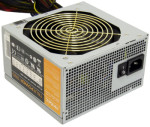
 Couple weeks back I got a request to repair a friends computer. It would lock up, not reboot, etc. The computer was largely for gaming, so after an initial software scan, I figured it must be heat. Opening the machine, I noticed none of the case fans are running. I had initially done the build on the machine, and new all the case fans were wired to the fan power “bus” provided by the power supply (which handled speeding/slowing the fans based on case temp), an Antec TruePower Trio TP3-550. Asking the friend, he mentioned that he had noticed the LEDs on the front case fan had went out a month or two ago. Hmm. Checking the voltage on that fan bus showed only 2V (not nearly enough to run a 12V 120mm fan). The PSU’s fan was also not running. Crap, that was probably overheating the PSU, and causing the instability.
Wanting to get his machine back up and running, I picked up a replacement Corsair power supply, installed it, and got him on his way. Then, I went to repairing the Antec power supply. Warning, because this is a power supply, and especially because this is a high wattage switcher, there are dangerous (and lethal if you live in parts of the world that run off 220/240 household) voltages inside. Make sure the unit is unplugged, off, and even give it an hour or two for the primary caps to discharge. I have seen the primary discharge relatively quickly, so there must be a bleeder resistor in the unit, but I didn’t bother tracking it down.
 I often find myself repairing electronics that have blown caps, or bad switches, or worse, a bad IC that has 14 to 28 legs. Caps you can cheat and heat one leg, then the other, and work them out (this can be risky, as you risk lifting a pad), and ICs you can cut all the legs and then remove the legs one at a time, but this always felt… desperate. So, when I had the chance to buy a desoldering gun, I jumped on the Hakko FR-300. It replaces the oldy but goody Hakko 808 that people often complained about a short power cord, and other small things. Anyway, Hakko seems to addressed all of these with the FR-300, as it is… awesome.
 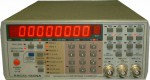 Like nearly ever other Racal-Dana 199x owner, I have the mushy/lifeless buttons, so this last week (during vacation) I decided to do the replacement work. It involved unsoldering all the stock buttons (34 of them). Thankfully I have a