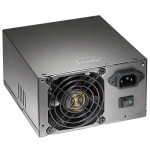
 Power supply repair number two, for me, is repairing a unit I’ve had for years, and “works”, but frequently, it will power up the the computer, then almost immediately power it back off, and require flipping the switch on the power supply off and on to get it back “working”. This behavior is indicative of either the Over or Under Voltage/Current latch kicking in (this could be semi-confirmed by unplugging fans, or hard drives from the power supply, and it would start up much more reliably). If the unit did successfully power up, it would run the computer with no problems for weeks/months at a time (I had the unit powering an IPTV box for 6 months previous to teardown for repair). Testing with my Dr. Power II shows everything is fine, but the tester only puts a couple ohms of load on the unit. Real testing requires an actual PC load (or a much larger load than I can provide with my Reload:Pro). Opening the unit, I found that several of the solder joints between the output wiring, and the “jacks” for attaching cables looked “cold” or “dry” (meaning, non-good solder connections) (See picture here). This can certainly lead to protection kicking in on devices. Reflowing these connections took a bit of time due to the thermal mass of the wiring and connection board, but after, the connections did look much better. Testing again showed everything was fine (as before). Hooking the unit back up to a real PC showed consistent power up. Calling this one fixed, for now.
Partkeepr and PHP 5.6
 Because I couldn’t find any info on this myself (and therefore my Partkeepr install has been broken since updating to PHP 5.6), and it took the developer of Partkeepr some thought on how to Google for it himself, I thought I would post something quick on Partkeepr and PHP 5.6. Basically, it works, but only if you don’t have a couple options set with PHP 5.6’s Zend OPCache (the built-in OPCache in 5.6, which largely deprecated APC). There are two options for opcache that completely break several frameworks, such as Doctrine, which Partkeepr uses extensively. The options are:
opcache.save_comments
opcache.load_comments
If either of these options is set to “0”, things break. And of course, if you read the notes on “opcache.save_comments” it mentioned breaking Doctrine. So, make sure they’re set to “1” if you’re using any of those frameworks, and especially if you’re using Partkeepr. I banged my head against this for days.
The developer of Partkeepr, however, is going to have a runtime check in a new version that makes sure those two options are set properly, otherwise have Partkeepr throw an error. Here’s the initial bug report of mine. Hopefully this post will help someone, and save them some hair being torn out. =)
UPDATE: I was able to just enable opcache.save_comments and load_comments for just my partkeepr domain by setting:
php_admin_flag opcache.save_comments 1
php_admin_flag opcache.load_comments 1
In the VHOST configuration for apache. This lets me leave them both as 0 for all my other sites, thereby gaining the reduced cached sizes. =) Good luck!
Re:Load Pro Fan Kit
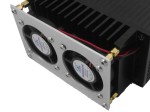 As a relatively early adopter of the Re:Load Pro I have been excited about the fan kit that was announced around the same time as release, effectively doubling the power dissipation of the load, and still maintaining a price point well below a commercial product like the BK Precision 8500 (though obviously a significant difference in power dissipation). When Arachnid Labs finally announced ordering for the Fan Kit, I was nearly first in line, and then by the end of Feb 2nd, 2015, the kit had showed up at my door. Install instructions (currently sans pictures) are on the Arachnid Labs site. Install was relatively painless, and involved soldering two headers to the control board, putting the fan leads through the heatsink hole, soldering the fan leads to the control board, and finally soldering the board to the main RL:P board. The real issues with the install are that the hole on the heatsink is just a tiny bit small for the fan wires (leading to some shaved insulation off the wires), and that the header holes on the main RL:P board are drilled on the small side, so mating the headers required a fair amount of pressure to push the board in enough to solder the headers on the backside. Both of which fixes should be easy enough for Arachnid Labs to fix in a future product run. The only other thing is a QA problem (or maybe purchasing). One of the two fans on my unit has a fair amount of bearing rattle at low speeds (and goes away at higher speeds). I may be able to fix this with some lubrication, or I may just replace both fans at a future date with some Noctua fans.
Total install took less than half an hour, and firing the unit up afterward was greeted with silence (the fans don’t run when there’s a low amount of heat). I knew the RL:P could dissipate 25W continuously before the fans, and the claim was the fans doubled that, so, I went for broke, and wired up to have it dissipate 50W. The fans quickly ramped up to full speed, and the unit kept on chugging (even though the whole aluminum case of the unit got warm after an hour of dissipating that load). Turning off the power, the fans ramped down relatively quickly, and continued to run (slowly) for well over 15 minutes cooling things back down, then finally turned off. Sweet. The only missing feature is being able to display the temperature on the front panel (I’m assuming this is coming in a future firmware release). I haven’t tested it’s full capability, but it didn’t have any problems with a load of 55W the next day.
All and all, very happy. While the unit was a bit more than I would have liked, it’s still extremely capable, and the designer has been wonderful to work ask questions of, ask for improvements, etc. And the few issues I’ve had with the install will no doubt be addressed in future hardware revisions, or he’ll just start selling the fan kit standard, and let the manufacturing house deal with the install. =)
[xrr rating=5/5]