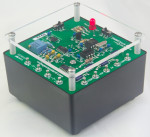
 As some may have realized, I have a decent number ((10, by last count)) of multimeters now but since all of them have been purchased second hand (eBay, or Goodwill), and several of them have been repaired, I had no real solid confidence in any of them as being highly accurate. Though, to be fair, I didn’t have any real reason to doubt them either. I did check in to see what calibration of one of my Keithley 196’s would cost, but the number was much more than I’d want to pay (I believe it was about $450). So, I’ve been eyeing a product called the DMMCheck Plus for a while. It provides a 5V DC and AC, 1mA DC and AC, some precision resistors (100R, 1k, 10k, 100k), and a 100Hz frequency to check your meters against. All of these are calibrated by the guy that makes them with his 8.5digit HP meter, that’s NIST traceable. Meaning I should be able to check against it for how far out of calibration any of my gear is.
I happened to have a PayPal balance, so I purchased my DMMCheck Plus through eBay and since they’re made up in southern Washington, I received it the day after shipped (I think from order to receipt was 3 days). The unit comes with a battery (which is how it’s calibrated), a hand filled in calibration sheet (showing the values for each test), number of burn in hours (mine was burned it for just over a month), and instructions. It’s really quite easy to use, and well worth the money, I think, to at least get a sense of how accurate your meters really are.
What I didn’t expect was what would be the most “in cal”. My Fluke 8060a that I purchased for about $40, replaced the caps on, and mainly have for nostalgia, was the most calibrated of my handheld meters. My Keithley 199 was the most in calibration of my bench meters. And amazingly (though not surprising given everything else I’ve seen with it), my Racal-Dana 1992 was amazingly accurate. The calibration of the 100Hz source says it should be 100.004608Hz, and my 1992 on a 10s gate showed 100.00463493Hz, or off by only 0.000026Hz ((Accounting for significant digits)). My other meters were all close enough for my work, and certainly not so far out that I’d pay for a calibration. I’ll definitely be double checking with this device now and again. Really makes me wish there was some ability to make a pocketable voltage reference that did 300mV, 3V, 30V, and 300V, as those are the ranges for my Keithley bench meters. But, battery driving for 30V and 300V, and getting a stable reference value might be tough. =(
Really, I’d highly suggest picking up one of these if you actually worry about your calibration for meters, or just have no idea how good or bad they are.
[xrr rating=5/5]
 I had an interesting issue hit my site recently, that I still can’t figure out WHY it happened, but after a few days of troubleshooting, I have figured out what happened, and how to fix it.
 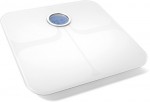 Being, obviously, a Fitbit fan, I picked up a Fitbit Aria a bit ago to track my (and the rest of my family’s) weight. I had been waiting patiently for them to update the Aria to support something a bit more modern than 802.11b, but sadly, that didn’t seem to be in the cards given their lack of response on the forums to requests for such functionality.