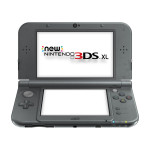
 This last weekend I purchased the New Nintendo 3DS XL that was just released here in the US. I had previously been using an original 3DS that was given to me a while ago. It worked fine, but I only ever played anything in 2D as the 3D gave me a headache, and overall, the unit felt a bit like the original Nintendo controller: a sharp cornered brick. But, I’ve completed a games on it, and played several more (including a VERY long game of Bravely Default at over 110 hours and counting) and it serves it’s purpose. But, I wouldn’t call the original overly enjoyable. It was really just a DS with 3d capability that I never used (think I turned it on once or twice for Link Between Worlds). When the “New” 3DS was released in Japan, and reviews started showing up, I actually got excited that this may actually be the 3DS that everyone thought the original was. Then, when it finally released in the US last week, and I had some money made from a contract gig sitting around, I decided to buy one and give it a whirl.
Short version: it’s pretty great.
Long version: The migration from my original 3DS was painless, if not a touch annoying given Nintendo’s overly paranoid piracy concerns. You’re greeted several times by warnings that the old device will be wiped, as will the new one, and that it’ll take HOURS to do the migration, etc etc. Once I finally got through all the prompts for the migration, it only took about 30 minutes to migrate from my 3DS with a 2GB SD card, to my “New 3DS” with a 32GB MicroSD card I put in it (I had one laying around I’d bought for my Raspberry Pi. It came with a 4GB card). The transfer creates a point-to-point (AdHoc) wifi connection between the devices (sadly only 802.11G), but it seemed fast enough (albeit with kind of annoying Pikmin noises). Once that was done, it was finally time to try out the “New 3DS”. I fired up Bravely Default, and first off, noticed it loaded in what seemed like (at least) 2x the speed. Also, the sound was amazing. Stereo! The original 3DS was only mono sound (it only had one speaker). Then I tried the 3D. Wow, it actually looks decent, and after 30 minutes of playing, doesn’t give me a headache! There is occasional 3D flicker that happens as the 3DS tries to find your “head”, but it’s rare and usually stops once it gets a good “lock”. I’m sure they’ll make more tweaks to that algorithm as time goes on. I haven’t yet had a chance to play “Link Between Worlds” on it yet, but I’m sure it will be much more enjoyable with 3D, and better sound.
Overall, I’m extremely happy with the unit. It is a bit bigger than I was expecting (since I’d never used a 3D XL before), but it feels good in the hands, and plays very well. I will really enjoy playing Xenoblade Chronicles on it since I have long ago stalled out on the Wii version (just don’t fire up the Wii much anymore).
[xrr rating=5/5]
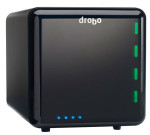 I wanted to post this review 2 weeks ago when I first received my 3rd Generation Drobo, but sadly, the unit was DOA. After talking to Drobo via email ((a less than ideal experience as they made me register the unit first, then refused to answer questions I had asked several times like “do you send a new unit or refurb” and “what is the shipping process”)), I got the unit replaced via Adorama since they would send out a brand new unit. The ship back got there a week later, and for reasons unknown, Adorama waiting several days to ship a replacement. They did apologize for the delay, and upgraded the return shipping to overnight. I had the new unit the following day, and first thing I did was power it up with no drives in it to make sure it worked. It did power up, and went through it’s initial setup scheme. Being confident it would work, I powered it off, and dropped it in place of my 2nd Generation unit, and swapped the drives over. Power up didn’t take that long, but you could tell it was doing some migration of the data as they drives could be heard chunking away for a while afterward.
  As a relatively early adopter of the