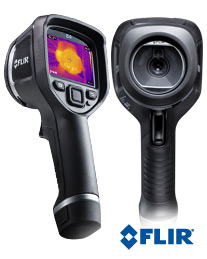
 I know I’m late to the Thermal Imaging Camera (TIC) party, but I just recently picked up a Flir e4 off eBay for a steal (about half price) from a seller that clearly didn’t realize what they had ((I say that because the unit had firmware 1.19.8, which is supremely hackable, and goes on eBay now for at least a $500 premium)). The unit arrived and although the battery was mostly dead, it fired right up, and worked great. I’m not going to go into too many review points since it’s been reviewed here by someone much more qualified than myself. Mike also is the source of the information that got people hacking these cameras from the e4 to the e8 model. Basically, a $1000 camera becomes a $4000 camera. This is because Flir, logically so, used the same hardware for the e4, e5, e6, and e8, they just limited the resolution through software. From a manufacturing standpoint, this makes great sense. And I’m sure they also QC the whole unit differently based on the model. That said, Flir has tried to fight this process via firmware updates to the unit, but as far as I know, each of those firmware changes has been circumvented (all of that is documented on the rather lengthy forum thread on the eevblog forums). Before the “upgrade” the thermal image was, I would say, useful. Especially with the MSX tech in the EX series. Basically, it overlays the “edges” of a visual 640×480 camera on top of the thermal image. The e4 defaults to 80×60 resolution in IR, which at a distance, is fine. Sure, a hot spot might look like a blob, but it’ll get you in the neighborhood. But after the upgrade, seeing 320×240 (16x the resolution), it’s amazing. The upgrade also buys you things like Picture-In-Picture, auto-hot/cold spot detection, etc.
My only complaint about the hardware has been spoken elsewhere: using MicroUSB seems like a bad choice by Flir. Just seems like it’ll break at some point. Also, interestingly, on the Mac (10.10.3), when you plug the unit in, it mounts the internal memory as a memory card. But trying to eject it, it just remounts 5 seconds later. =/ Interestingly, you can change the camera to UVC mode (which allows it to be used like a webcam over USB), but that seems to kill the ability to pull images off of it. Also interestingly, the Flir tools for the Mac (Version 2.1 off the Mac App Store) don’t see the camera at all (this could be due to the “upgrade”). The Windows version works fine.
Another odd thing was charging. I thought the unit wasn’t charging with a normal USB charger, but it turns out if the unit is “off” (or rather, in it’s “sleep” state), it doesn’t show the charging icon unless you press the select button on it.
I also bought the soft case for the unit, as the default Pelican style case is obnoxiously huge for the unit. I’d rather grab it, my Fluke DMM, and go… with the default hard case, that’s nearly impossible and still having a hand free. Further, the EX series is already rugged. No reason to throw it in a case that could probably take a 10M drop. Maybe if I was flying around the country with it and wanted to check it. Guessing the case choice was made by the same group that designs FLIR’s military style which needs the rugged cases. I have no idea.
Overall, I love (LOVE) the unit. And coworkers have been drooling over it a bit as well. I expect I’ll be doing insulation audits on their houses at some point. One professor is wanting to know how it works for seeing people in the dark (I’m sure he’s thinking something related to Sasquatch). =)
[xrr rating=5/5]
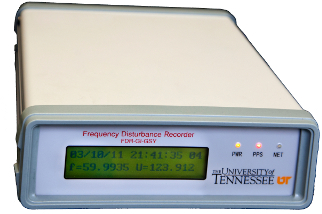 Being a data nut, a relatively recent electronics enthusiast, and now a burgeoning “time nut”, there was a thread on the timenuts email list on monitoring the
  I recently installed the “new” version of phpmyadmin, and noticed that it didn’t work (in Chrome or Firefox, but did work in Safari). After a fair amount of troubleshooting, I found there’s a setting in config that is: