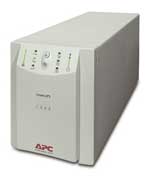
 Having just gotten a replacement battery for my Smart-UPS 1400, I went to replace the battery, only to have the UPS randomly shutdown. I had had this issue before where if you removed the front panel and metal plate, the UPS would randomly turn off and on again. Figuring it was some cold solder joint, to bad ribbon cable between the front panel and UPS, I took everything apart to troubleshoot. Sadly, I couldn’t find the issue. I did decide to figure out why the battery never seemed to seat fully, and really, it’s due to bad design on APC’s part. The terminal connector for the battery is supposed to neatly fall into a recessed area of the chassis, and lay flat enough for the battery to seat. 9/10 with my unit though, the terminal would end up sideways, and prevent the battery from fully inserting. Worse, and this is why the unit was turning off, when this happened, and you tried to press the battery all the way back, one of the standoffs holding the PCB to the chassis would tweak enough to cause some board fault, and shut down (I haven’t dug further, I just saw the tweaking happening when the UPS case was removed).
So, as a note for anyone that might have one of these units. Don’t try to hotswap the battery. Just shut stuff down, remove the case (6 screws on the bottom), and then replace the battery while you can see the terminal connection. Then you can actually see if it’s laying properly in the chassis, and the battery will slide all the way into the unit. You can “help” it do this by making sure the battery cables are laying “down” rather than up, or back. Just, a crappy design on APC’s part. The only way I can see it always working right would be if the battery, and UPS, cables were silicone coated rather than PVC, and therefore were a bit more relaxed, and wanted to let gravity have it’s way. Maybe it also has to do with the unit being 20 years old at this point, and the PVC hardening. Either way, not a great design.
Good luck!
 Since moving off my Airport Extreme to the
 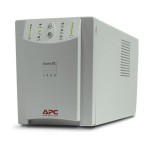 So, I ended up with a SU1400 Smart-UPS as a castoff from campus network services, and alas, it only has a serial (RS-232) port, not USB, and I’m attaching it to a Mac. So, I went online, and found out that lo, APC makes something to address that (only officially, it only works with the Back-UPS models). $37 later, I had the adapter, and plugged it in. Nothing. Nada. Zilch. Neither Mac nor PC would see the adapter was there. I figured it was dead, and prepared to RMA. But, on a whim, I decided to try putting a smart-signaling cable between it, and the UPS. Viola! My Mac instantly saw there was a UPS there. So, the adapter must be getting power from the serial side, and not the USB side. Weird.