Everybody Staze...

Nobody leavz...

  • Home
  • About Me
    • LinkedIn
    • Lab
  • Contact
  • Links
  • Reviews
  • Sitemap
  • Weather
You are here: Home / Archives for Reviews

The Energy Detective (TED) 1001

2009/10/24 By staze

TED1001<Disclaimer>I will admit, first and foremost, that this review is a bit later than I would have liked. Since the time I started wanting to review the TED 1001, the 5000 has been released that offers a few major advantages. Mainly, bang for your buck. The TED 5000 allows you to upload power data to Google Powermeter, which gives real time power graphing, much like I had to hack together on my own on my website here. With all that said, let’s get on with it.</Disclaimer>

The TED 1001 is probably the first widely available whole house energy monitor device that allows someone to see how much power their home is using instantly (1 second time resolution). The display unit is accurate to 10W. Very few items in the house draw less than 10W when they’re on, so this will generally give you a pretty good idea what kind of power your home uses.

Installation of the TED is fairly simple, if not hair raising. The CTs have to be installed around the primary power feed for the breaker panel. Which, unless you have a master shutoff between the meter and the panel, or you pull the meter itself, means you’re potentially interacting with a 200AMP, 240V feed. But, you don’t actually have to touch those, and if you’re concerned, an electrician could do the job in about, 10 minutes, max. Once the CTs are installed, you hook those up to the MTU, and the MTU to a new breaker. The most difficult part of that is figuring out what phase to install the new breaker on, since it has to be the same phase as what the display is going to hook to. Which brings up basic home power…

Your home power is generally supplied by two 120V phases (why there’s the two big power feeds coming into your breaker panel). Combined, this gives us a 240V 2-phase system. If you look at a breaker panel, it kinda looks like two ladders on top of each other. One of these ladders is one 120V phase, the other is the other 120V phase. Normal breakers attach of just one of these ladders, and therefore supply 120V. Breakers for stuff like water heaters, stoves, HVAC, dryers, etc all connect to a “double pole” breaker, which connects to both ladders. So, you get 240V. So, those two phases that come into your house come from a transformer somewhere that breaks them out into single phase lines (power coming down the poles is much higher voltage, and usually 3-phase).

So, with that in mind, from breaker to breaker in your panel (going top to bottom on one side), you get alternating phases. So, when you go to plug in your MTU to a new breaker, you have to figure out what phase the outlet you plan to plug your display into is on. Otherwise, the MTU talks to the opposite phase, which goes out to the street transformer and then crosses to the other phase and comes back to the Display. Potentially hundreds of feet. This is bad. You can get a phase coupler that goes into your panel, or plugs into a dryer outlet, but it’s just easier to hook it to the right phase.

Once that’s all done, you can turn on that new breaker, and plug in the display. You should start seeing good data once you configure the TED display. It’s pretty cool all and all.

All things considered, if the 1001 was the only option from TED (assuming the 5000 was not yet released), I’d say BUY ONE! They’re a wonderful tool to figure out where and when you’re using power. If you want more specific power usage, pick up a Kill-a-Watt. You plug individual 120V items into them, and they’ll tell you how much power they’re using.

My biggest complaint about the TED 1001 is the cost of unlocking the USB port on them, $45. Thats even if you don’t use their software (which I don’t, I just use a Python script written by someone else).

[xrr rating=4.5/5]That .5 deduction is simply the cost of the unlock, mixed with how poor the software is (windows only, doesn’t help).

Here are some links of interest:

-TED 1001 Purchase : http://www.theenergydetective.com/store/teds/ted-1001.html
-Google Power Meter: http://www.google.org/powermeter/
-Energy Circle (great website about energy usage): http://www.energycircle.com/
-Youtube video showing install of TED 1001: http://www.youtube.com/watch?v=bgcvvJPX46M
-Python Script to poll TED: http://www.staze.org/static/code/scripts/ted5.py (local mirror: http://www.staze.org/static/code/scripts/ted5.py)
Filed Under: Reviews Tagged With: Energy Circle, Google PowerMeter, KWH, TED

CobaltFlux Controller Box

2009/10/19 By staze

In February of 2004, as a birthday present for my then Girlfriend (now wife), I organized a joint gift from all her friends so that we all donated money to a large gift. In this case, it was a CobaltFlux DDR pad. They were, and are, the best home dance pads for DDR/Stepmania you can get. They take a few weeks to build, and are all built to order, so a few weeks later, I got the pad.

The pad is pretty cool, and still works great after over 5 and a half years. However, I have never been overly happy with the control box (the thing that takes the input from the DDR pad, and translates it into something a PSx can understand.

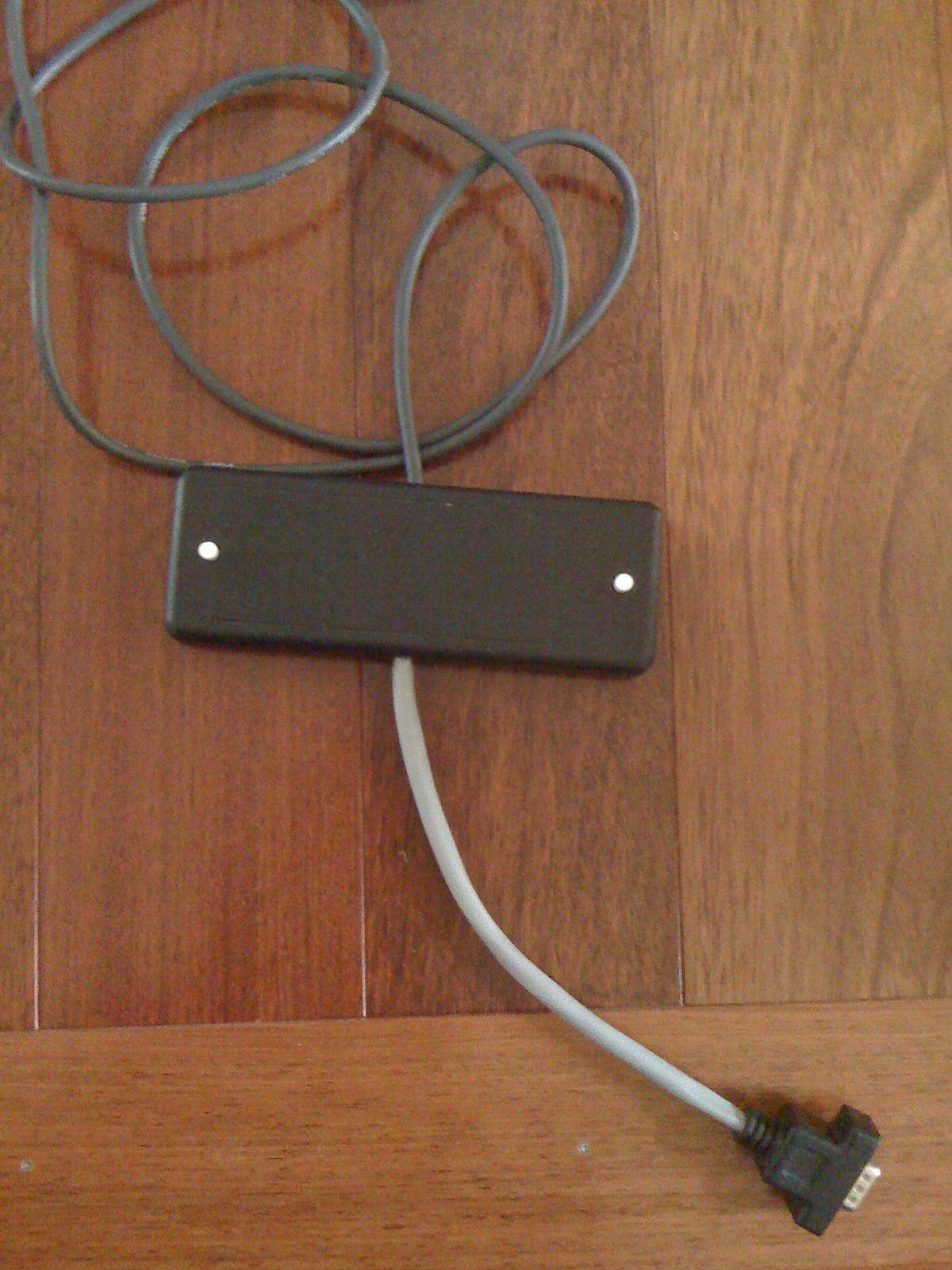
Version 1 (15pin) CobaltFlux controller Box

The problem, is it just seems kinda janky. Mainly the short pigtail that connects to the pad’s pigtail. It always seemed very out of place with how well constructed the pad is. The box just ends up kinda laying on the ground, asking to be stepped on, and the buttons for Start/Select are too small to be “foot buttons” so it’s placement just seems wrong. On the end of the cable out the other side is just a male PSx connector. Which leads us to our other adapter…

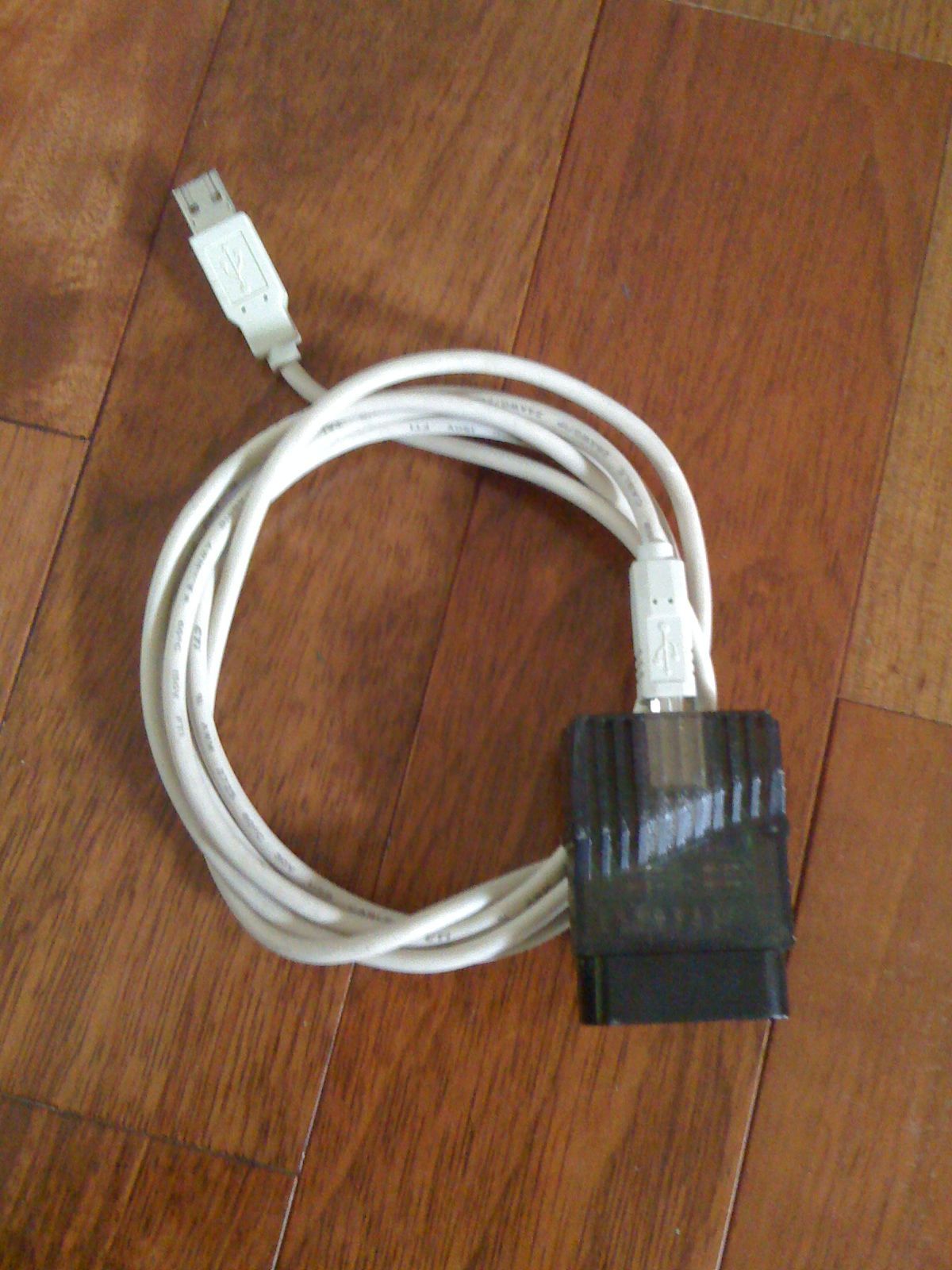
Then there’s the whole getting the PSx output to something you can use in Stepmania. Luckily, I was able to purchase the best converter box ever produced before the company went out of business (I think that’s what happened), the PS Joy, made by Boom (picture on the right).

PSX-to-USB Converter (Boom PS Joy)

It is just a little converter box that has a female USB-B connector on one side, and a female PSx connector on the other. The games don’t need any tweaking, it just works. Or at least it did, until about 3 weeks ago.

So, 3 weeks ago, my wife goes to play DDR, and the pad doesn’t work. Neither do the buttons on the control box. I fiddle around, grab a PS2 controller (which ends up working), and determine that the control box has died. So, I go online, and order the new V5 control box (after confirming that my pad does in fact have a 15pin connector). About a week goes by, and the new box shows up at my door.

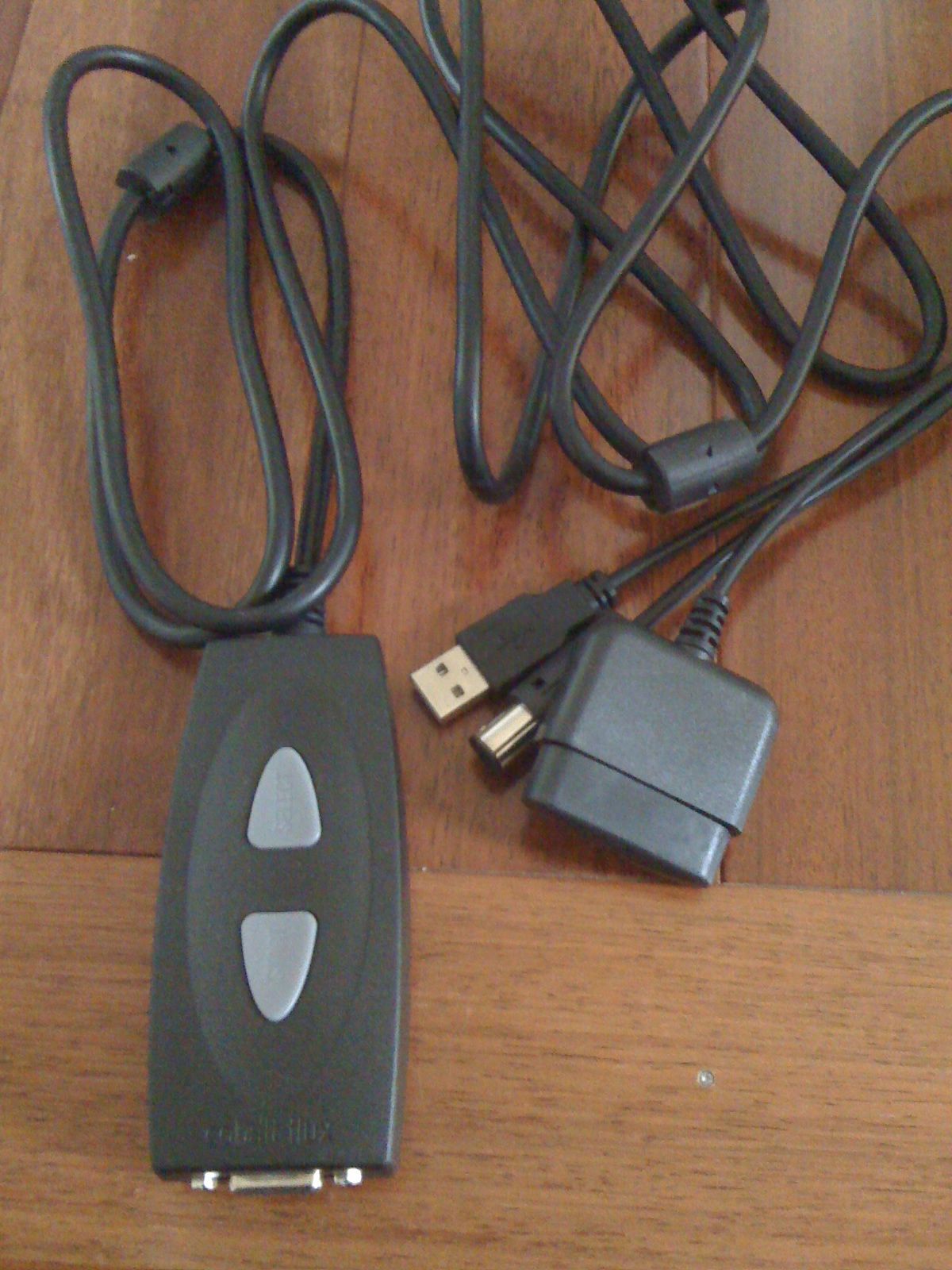
Version 5 CobaltFlux controller Box

I have three words for what I think: “Night and Day”. This new box is more like it. Not only is it well built, but as you can see in the picture (on the left), it has a PSx output, Gamecube/Wii output, AND USB!!!! The USB is intended for PS3 compatibility (and with an adapter, “should” work on an Xbox), but it works flawlessly on a computer. Not only that, but CobaltFlux seems to have figured out that the buttons on the control box are really for hands, so lets put the box where someone can reach it without bending over. So, between the box and the pad, they include a removable 8′ 15pin male to male (basically VGA) cable. So you can put the control box up on the surface that holds the TV, and actually reach it.

The new box is, from what I can tell, perfect. It’s what the box should have always been. We’ll see what time does, but all and all, I’m extremely happy, and would recommend anyone with a version 1 15-pin control box to pick up one of these, or add them to a wish list somewhere. My only complaint, and it’s not much of one, would be: It would be cool/nice if there was one or two LEDs on the controller box to signify power being received from the host device, and maybe one to indicate a button being pressed on the pad itself. This would make it a lot easier to troubleshoot issues should they arise. But, other than that, definitely a 4.9 out of 5 stars.

Links:

CobaltFlux
Control Box v5

Filed Under: Reviews Tagged With: BOOM, CobaltFlux, DDR, PS Joy, Stepmania

Time Management for System Administrators

2009/09/20 By staze

time_mngmt_sys_admin_comp.inddTitle: Time management for System Administrators
Author: Thomas Limoncelli
Publisher: O’Reilly Media
Published: Nov 2005
Amazon link: Paperback
Rating: 5 out of 5.

Having owned this book since early 2006, I can say I’ve read it a few times, which helpfully is what the author suggests in the book (multiple readings). I first found out about the book via a review on Slashdot (here). The book, by and large, has changed the way I work every day. While I can’t say I’m the best at following the suggestions, I do try.

The biggest point of the book, and what any SA should walk away with, is the notion that brain power is better used doing your job, and not keeping track of tasks. So, use something “trustable” to manage your tasks. In the authors case, a “PAA” or Personal Analog Assistant (a day planner). Write everything down, so that you don’t have to remember it for more than a few seconds. Carry it everywhere. I tried this, since when I first read the book, Palm was the only real PDA available, and they didn’t work nearly as well as one would like. So, I bought a Franklin Covey planner, and used it. Never worked very well, being a lefty. Stopped trying within a couple months. I pretty much gave up on a lot of the process until I got an iPhone 3G. Once I had one of those, things really started coming together. Largely due to one set of programs, one a desktop app, and one an iPhone app: OmniFocus. At that point, keeping track of items became as easy as pulling out my iPhone to add an item, or adding something on the desktop. Now, I don’t have to keep track of “to-do’s” in my brain. OmniFocus does it for me.

After reading the book the first time, we also implemented RT at the office. This has since been merged into a campus-wide RT system, but either way, the ability to have Troubleticketing is another step toward working more efficiently.

Between those two items, there is a missing part (I think) that a Wiki fills. I personally really like Dokuwiki, but any wiki will work. It allows for easily documenting processes, documenting systems, etc.

The only part(s) of “The Process” I haven’t been able to enact have been the mutual interruption shield, and planning my day in the first 5-10 minutes I’m at work. Both of these are due to my placement in the office (being right next to the door). This is going to be changing in the coming weeks, when I’ll actually be in the back of the office, and people will have to work past several others before getting to me.

All and all, the book has greatly increased my productivity, and allows me to actually have idle time at work. I get more done, and have more time to work on “fun” projects. All and all, I highly recommend it to all SA’s, and SA bosses.

Filed Under: Reviews Tagged With: DokuWiki, O'Reilly Media, OmniFocus, RT, Time Management for System Administrators, Tom Limoncelli

« Previous Page
Next Page »

Weather

Categories / Archives

  • Apple
  • Coding
  • Electronics
  • Energy
  • Home Ownership
  • Miscellany
  • Politics
  • Prius
  • Sys Admin
  • Travel
  • Uncategorized
  • Work
  • April 2026
  • August 2025
  • April 2025
  • January 2024
  • February 2021
  • July 2020
  • January 2020
  • April 2019
  • March 2018
  • February 2018
  • June 2017
  • February 2017

Copyright © 2026 · Staze On Genesis Framework · WordPress · Log in