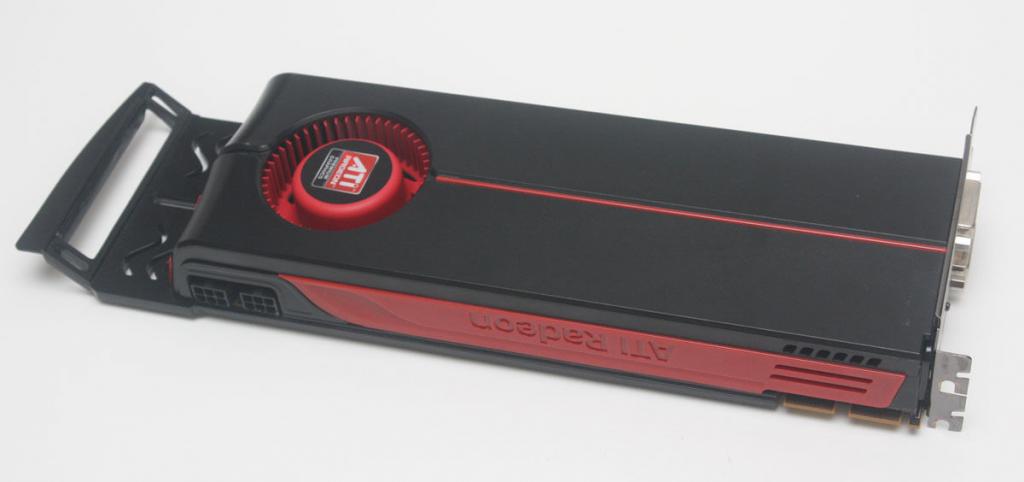
 I have a couple Mac Pro’s at work (well, 3) that sit behind my desk doing render jobs, and running BOINC. They’re Mac Pro 1,1’s, so they date back to late 2006, but I’ve upgraded them with dual quad core processors, so they do okay. I’ve been keeping an eye out for ATI 5870’s to put in them for some GPU grunt, but they generally sell on eBay for $100/each. A couple weeks back, I saw someone was selling 2 for $75 total, and snagged them up. Once they got here, though, I realized an issue. They were made for some Dell, and have a weird bracket on them that you can see in the picture. It’s angled off to no doubt fit into some holder that those specific Dell’s have. Anyway, just thought I’d post that they DO work in the Mac Pro, you just have to grab a Dremel (or hacksaw) with a cutoff wheel, and after unscrewing the 12 or so screws that hold that bracket on, remove it, and cut the angled part off. Seriously, don’t try to put it off while it’s attached to the card… metal filings/dust are not great for electronics. The card then looks like a stock ATI reference card, and fits perfectly.
Make sure to throw the aluminum (aluminium) in the recycle bin. =)
 In 2006, work purchased a Mac Pro for me. At the time, and for years after, it was a great machine. Since its purchase, I had upgraded the CPUs, the GPU, and done everything I could to keep it chugging along for as long as possible, partly because of the ever present rumors for the last several years that Apple was just about to release a new Mac Pro. Then, finally, late last year, they finally did, and obviously it was a pretty large change from the previous Mac Pro. So, as my Mac Pro approached 8 years old, my boss ordered me a new Mac Pro, with the price understanding that a fully tricked out iMac every 3 years would amount to about the same cost as this machine. Hopefully that proves to be true. =)
 Google introduced their Print Preview functionality back in the Chrome 15 days, and until Chrome 20 or so, you could go into “about:flags” and turn it off. In Chrome 20 or so, they took that option away. Now all the threads online are full of “just use the “Command-Option-P” crap ((Google seems to think Adobe had the right idea when they created their own Print dialog, when in fact, it’s really stupid. Augment the dialog, don’t replace it with something completely different than every other app)). While I rarely print, I do frequently “Save as PDF”, and I find the process, and output much easier/better using the system dialog.