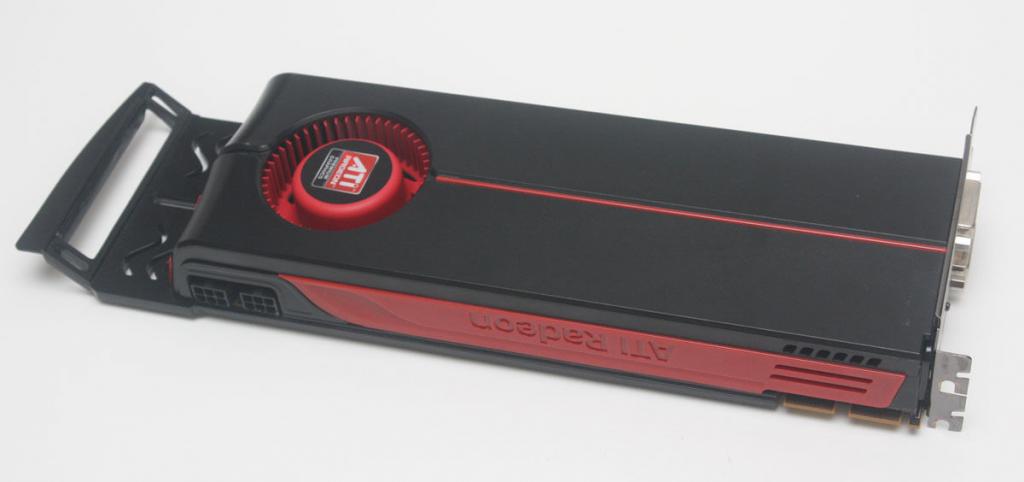
 I have a couple Mac Pro’s at work (well, 3) that sit behind my desk doing render jobs, and running BOINC. They’re Mac Pro 1,1’s, so they date back to late 2006, but I’ve upgraded them with dual quad core processors, so they do okay. I’ve been keeping an eye out for ATI 5870’s to put in them for some GPU grunt, but they generally sell on eBay for $100/each. A couple weeks back, I saw someone was selling 2 for $75 total, and snagged them up. Once they got here, though, I realized an issue. They were made for some Dell, and have a weird bracket on them that you can see in the picture. It’s angled off to no doubt fit into some holder that those specific Dell’s have. Anyway, just thought I’d post that they DO work in the Mac Pro, you just have to grab a Dremel (or hacksaw) with a cutoff wheel, and after unscrewing the 12 or so screws that hold that bracket on, remove it, and cut the angled part off. Seriously, don’t try to put it off while it’s attached to the card… metal filings/dust are not great for electronics. The card then looks like a stock ATI reference card, and fits perfectly.
Make sure to throw the aluminum (aluminium) in the recycle bin. =)
 I recently repaired a Dell E173FPb monitor from my wife’s work that would just start up black, with no “2 seconds to black” or anything like that. The common issue with these monitors is the backlight transistors on the power supply shorting. When I got the monitor, I pulled them, and indeed, a pair of them were shorted out, so I ordered some replacements through a pretty highly rated, Chinese, eBay seller. After receiving them, I dropped them in, and it STILL didn’t work. So, I ordered replacement FETs (since testing FETs is a bit troublesome at times), and those didn’t work either. Awesome… so I put the original FETs back, and set the monitor aside for parts.