Archive

Archive for February, 2010

URL Shortener

February 28th, 2010 staze Comments off

So, it’s been a desire of mine for a while to make up a URL shortener. It seems like such a trivial coding experiment, but a fun one.

The first hurdle, getting something better than base10 for the URLs. That’s fairly easy, in that you can look here. The code he lists isn’t complete, as you need some other stuff. So, go grab the Cassis project code instead.

Note: when you “include_once” that code, you’ll want to do it like:

ob_start();
include_once("./cassis.js");
ob_end_clean();

Next you’ll need to code up something to add URLs to your database. That’s also easy enough. My suggestion would be a simple table that would have “id”, “shortcode”, and “url”. Make id a primary key, and add an index on the “shortcode”. Maybe one on the “url” if your going to be using the system heavily enough to require checking to see if a URL exists already before blindly creating a new short-url.

The last hurdle is to write the decoder. Basically, just have it look for “GET”, and look that up in the DB table, then set the “header(location: )” to be the URL in the for that short code.

Now, normally, you’d have a mod_rewrite rule that looked something like this:

RewriteCond %{REQUEST_FILENAME} !-f
RewriteCond %{REQUEST_FILENAME} !-d
RewriteRule shortener.php?url=$1 [L]

Except, WordPress permalinks use something similar, and the two don’t play nice. Now, it would be cool to pass all URLs on to the decoder, and if it didn’t exist in the DB, you’d pass it on to the wordpress index.php. I haven’t quite figured out how to do that, but I found a pretty decent work around.

RewriteRule ^z(.*) shortener.php?url=$1 [L]

Stick that before the WordPress rewrite rules. What that will do is, if there’s a URL that starts with “z”, it’ll pass whatever comes after that “z” on to the decoder. Personally, I don’t have any pages, or files on my website that start with “z”, so it’s safe for me to do. Your experience may vary. If the decoder doesn’t find the url in the table, it simply redirects to my main page. I think I’ll change that to a 404 here once I am further along.

I’m going to keep playing with this. And hopefully, make some pretty spiffy use of it, but for now, it’s “basically” working. I’ll try to remember to post back on this topic when I have more to report on it. =)

Special thanks to my friend Aaron for the advice on this one.

UPDATE 1: I got 404′s to work for non-existant short codes. So, the key with wordpress is to use something like this

header("HTTP/1.1 404 Not Found");
include("index.php");

Basically, I was trying all kinds of other things, then realized that index.php for wordpress will look for the header state, and redirect appropriately. So, that’s it. It now throws a 404 (which, without that include, it would throw a 404, but it was just a blank page)… Cheers!
Categories: Coding Tags: Base60, URL Shortener, Wordpress

Vibram FiveFinger KSO

February 26th, 2010 staze 1 comment

I have been facinated by the Vibram FiveFingers since I first read about them online almost a year ago. Since then I have been checking the local REI every so often to see if they have them in. This week, they finally had them.

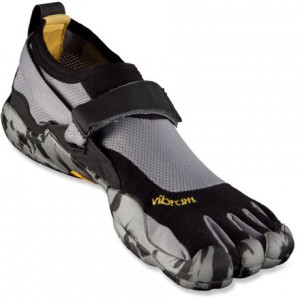
Men's KSO camo

First, I’ll say, trying them out is a process. If you can find them in a local store, go to that store prepared to spend probably an hour trying them on. First, go here and mainly, figure out the sizes you SHOULD be. Go to the store with that knowledge, and you will be much better off than just randomly trying on different things. Also note, different models fit differently. At the local REI, they have 3 models in Mens and 3 in womens (Classic, Sprint, and KSO). They all fit a bit differently, so basically, try on your size in one, then the size above and below. And maybe even the opposite gender version (if they offer the size you need) if the fit is a bit off on your gender (the difference between the gender’s is the womens are supposedly narrower at the heel, and ball of the foot… though I didn’t notice). Also note that feet change size/shape throughout the day. Especially if you work standing up all day.

All that said, my experience was a trip to REI on Tuesday night with my wife and a friend. We spent probably an hour or so trying them on, testing them out, etc. After all was said and done, I went home with some 41 Men’s, KSO’s. Once home, I tried them on again, and came to the conclusion they might have been too big. So, we jumped back in the car, and headed back to REI, where I tried on the 40 Men’s KSOs. They were too tight. So, I decided to wait through the night, and try again the next day (mainly because my big toe was upset at being in the 40′s).

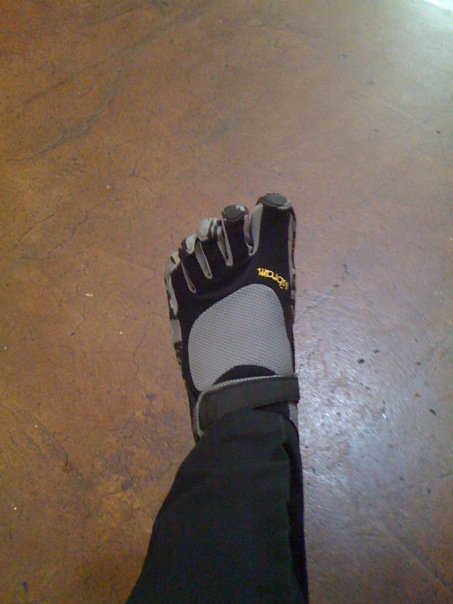
Next night, we went back. I tried on every model/gender they had in my size (took probably another hour). The 41 Men’s KSOs fit the best. But, being über paranoid, I decided to wait again, and went home. Next morning I woke up, and realized I wanted to take the plunge. So, my wife went and picked up the 41 Men’s KSOs again, and brought them to me at work.My KSO shod foot I put them on, loved them, and wore them all day. It was a blast. On a tactile level, they make walking a pleasure. I’ve never done ecstasy, but I can imagine that it would be absolutely amazing with these on. Everything you want on feels like something different. Shoes, you get “squishiness”, but you don’t feel the surface of what you’re on. Steel Plate, you could feel the diamond shapes. Pebbles felt like pebbles. Bark mulch was absolutely amazing to walk on (felt like being barefoot in the woods).

Alas, it was short lived. After the day of wearing them, I noticed something troubling. The shoes were pressing on my bit toenail rather awkwardly. Kind of a mix of pushing it back into the toe, and upward (like trying to rip it off). It didn’t hurt, but it was uncomfortable. And being as I have a history of ingrown toenails, I didn’t feel comfortable cutting it any shorter. So, alas, I had to return the shoes =( (I did find at least one other instance of someone having the same issue with their big toe toenail on the amazon website. So, I’m not crazy! =)).

All that said, I really loved them. While I didn’t really get to run in them, I can imagine it feels great. All and all, they’re an extremely liberating shoe for someone that isn’t a big barefoot person (I’m too paranoid about stepping on something, and my feet aren’t overly callused). The build quality was extremely good, and from talking with friends that have them, they last a pretty long time (over a year day in/out use in one case)… which is good for ANY shoe, let alone one that is hardly a “shoe” and more like a tough bottomed toe-sock.

Would I be worried about stepping on something in them? Maybe… but given the bottom, while I think something like an up-ended tack might penetrate the sole, I don’t think it would make it all the way through, or seriously hurt your foot. Glass I don’t think would penetrate either. The sole really is quite tough… yet flexible. I’d compare it to my Gatorskin bike tires. Though a kevlar backed VFF might be cool. =P

All and all, as I said, I loved them. They really are the best thing to happen to footwear since Bill Bowerman (though obviously that’s a contrary statement to barefoot running, but, he was revolutionary… as I think these will be/are). And, I’m going to continue trying on/out new models until I find one that works for me. They have a new model, the Bikila coming out in Spring 2010. I’m certainly going to try it out… though given it’s style, I’d imagine it’ll be similar to the KSO’s in toenail tension. =/

So, go try them on already! If they don’t change your life, they’ll at least change your attitude about the notion of “shoes”.

Notes:
KSO stock image taken from REI’s website.

Links of interest:

Categories: Reviews Tags: kso, vff, vibram

APC Back-UPS RS 700VA Master Control

February 20th, 2010 staze Comments off

Part 1 – TED Signal Sink
After a week’s wait from ordering it, my UPS arrived on 2/19/10. You’re never quite ready for how heavy these things are. Yay Lead. After bringing it home, and plugging it into it’s new home, I immediately noticed something. My TED (Review) RDU stopped receiving a signal from the transmitter down in the breaker box. Just what I was afraid of since I’d read about things like this in the past. UPSes can act as X10 sinks (the TED uses something similar to X10 signaling to communicate). Basically, X10 (and the TED) communicate at 120khz and 132khz (respectively) on the power lines. UPSes have noise filtering build in that basically shunts all frequencies other than 50-60hz to neutral. So this basically acts like a “short” for those X10 and TED frequencies, thereby draining them out of that phase (or the house if I had a phase coupler), since energy flows the path of least resistance.

So, damn. I plugged the UPS into an outlet on the other side of the house (which is on another phase on my power system) so I could at least make sure it worked, and get it charged, and went about ordering an X10 filter (this one). Now I get to wait another week until that arrives before I can actually put this UPS through it’s paces.

Part 2 – Post Filter
The filter arrived on Friday, and after putting it between the UPS and the wall, my TED signal no longer “disappears”. The extra cool part is that by putting the UPS behind that, and all my computer equipment on the UPS, I’ve now removed a big source of “noise” that can interfere with the TED. But, this review isn’t about that.

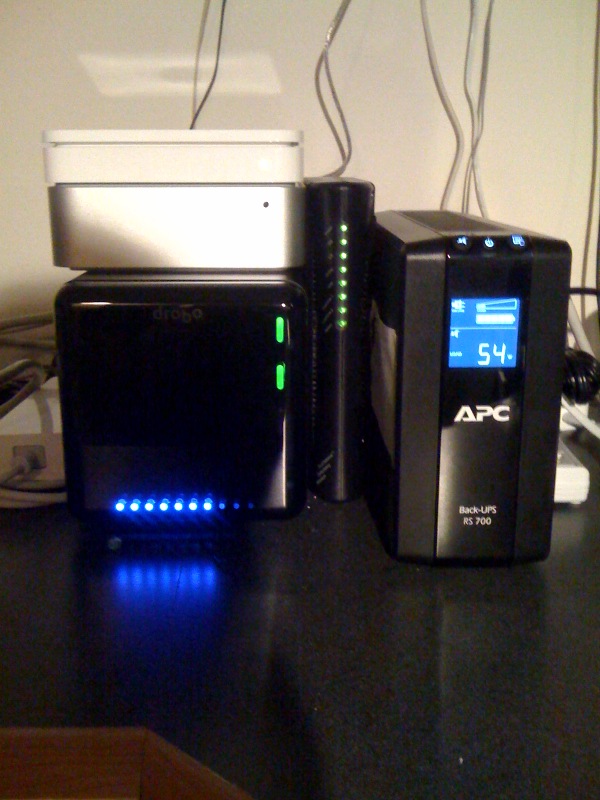
UPS installedSo, I moved everything around in the office, and installed the Mini, Drobo, airport, cable modem, and LCD monitor on the “backup” section of the UPS. The laser printer, my weather station base, and the cordless phone are all installed on the non-battery backup section of the UPS. See the picture to the left. You’ll notice that all that stuff on the “battery” side of things, only draws 54w. Which means I’ll get about 40 minutes of backup time with that load. Running the CPUs at full load on the mini results in 75w of draw. Still very respectable. I believe if the Drobo was fully loaded, it’s supposed to draw upwards of 40w on it’s own, but I can’t imagine that’s the case given it’s current load.

Looking at how 10.6 sees the UPS, I’m quite happy. The only odd thing is the “unknown time remaining” up on the menu bar, but if you go into the Energy Saver system preference, you can see 100% charge, and set all the settings like, power back on after outage, spin down the disks, put the display to sleep, the computer to sleep, etc. As well as telling the machine to shutdown either after any of the following:

  • Being on UPS for x amount of time
  • When the UPS has x amount of time remaining
  • When the UPS charge is at x or below

Extremely cool. It would be cool if the UPS reported remaining runtime to the OS regularly, and maybe it does and 10.6 doesn’t know to look at it. But, it doesn’t overly matter. Just like on a laptop, you can’t see battery life remaining while you’re plugged into AC.

All told, I’d give this UPS a 9/10. The only problem with it is that it emits a high pitch clicking sound. I’m not sure if that will fade with time, or if it’s just a byproduct of the consumer level APCs. Searching online seems to indicate it’s not completely unheard of, but it is a bit annoying. If I ever have a problem with the UPS, I’ll certainly mentioned that issue when I go to have it serviced. But all and all, it’s a great investment, and it’s nice to have that “piece of mind” incase of a random power outage (though they’re rather rare in this area given underground power, and a reliable power company).

Categories: Reviews Tags: APC, BR700G, Smarthome, TED, UPS, X10 Filter

Proxy Splunk behind Apache 2.2

February 20th, 2010 staze 2 comments

Splunk is pretty damn cool. And since Splunk 4, it’s been much easier to set up and run. And since my environment at work produces a lot less than 500MB/day of logs, I can safely use the free version of splunk. But, this has a downside. You don’t get user authentication (there’s other stuff you don’t get, but the big one to me is user auth).

So, the obvious solution is to proxy Splunk behind apache and have apache do the user authentication. There’s some good info about doing this online, but it seems none of it is complete for what I was trying to do.

So, here’s what I had to do. First, the relevant chunk in the apache config (if you’re doing this over https, you may want to add “SSLProxyEngine On” before the mod_rewrite section):

<VirtualHost *:80>
	ServerName server.example.com:80
	ProxyPass /splunk http://127.0.0.1:8000/splunk
	ProxyPassReverse /splunk http://127.0.0.1:8000/splunk
	<IfModule mod_rewrite.c>
		RewriteEngine On
		RewriteRule ^/(static.*) /splunk/$1 [P]
	</IfModule>
</VirtualHost>

So, on my server, I’d go to https://server.example.com/splunk to visit my splunk page. The rewrite rule is there to fix what seems like a bug in the “jobs” page for splunk, that doesn’t seem to obey the “root_endpoint” set below.

The second part of this is to set a few things in the web.conf.

In my case, since this is running on a Mac, these go in a file in /Applications/splunk/etc/system/local/web.conf

root_endpoint = /splunk
tools.proxy.on = True
updateCheckerBaseURL = 0

The first basically says “everything is in the /splunk subdirectory”. The Second I’d assume says “Splunk is being proxy’d”, and the Third is something I had to add to fix a weird issue I was seeing after doing all of this. Once I’d proxy’d it, every time I would open a new session to Splunk, I would see the “Checking for Updates” and then the “Agreement” page, which the continue button wouldn’t point back to http://server.example.com/splunk but just http://server.example.com/. So, That third line basically disables the update check. It’s kind of silly anyway since I keep an eye on the splunk.com webpage to check for updates.

As for securing splunk beyond proxy’ing it, I just set up a realm in Server Admin that locks down the /splunk location. Pretty easy.

Good luck. Splunk is pretty cool, and makes it dead simple to track down issues, get statistics, etc. I’m still not really proficient with it, but I hope over time I’ll learn more of what I can do with it.

Categories: Sys Admin Tags: Apache, Proxy, Splunk 4

I hate EULAs. Especially Apple’s OS X Client one…

February 17th, 2010 staze Comments off

So, I’m a Sys Admin. I spend all day running down problems, and when I’m not doing that, I’m usually working on bigger problems that are multi-day/week/month issues. And when I’m not doing that, I’m playing with something cool that’ll give us a better user experience, show us data we haven’t seen, etc. Add to this, we basically have no money (we’re State Higher Ed). So, the answer for testing issues is, obviously, virtualization (since we can’t afford to have test machines sitting around).

Now, VMware and Parallels both support Virtualizing OS X Server on Apple Hardware. They do not, however, support Virtualizing OS X Client, since Apple’s EULA specifically says “You can’t do that”.

So, being a Sys Admin, and not taking anything at face value, you look around online, and find various ways around this. Yes, it’s breaking EULA. But, I am running this on Apple Hardware, and we have broken machines sitting in a closet not running any OS. So, far as I’m concerned, it evens out. Obviously this wouldn’t hold up in court, but seriously Apple. The EULA should be something like: “You can virtualize OS X Client on Apple Xserve hardware” or something like that. Make the end user pay for it, but don’t make us hack software to make it work.

Anyway, the big thing that made me create this post is… VMware Fusion 3.0 changed things a bit. This info is still online except one minor tidbit. You HAVE to use physical media when doing the install. Don’t ask me why, you just do.

As for the rest of the info… I leave it to the readers. As for fixing the EULA… Please, Apple… Please.

UPDATE: The issue with VMware and physical media seems to be that VMware is convinced it should be attached to the VMware tools disk image to install that. If there was some way to get around that, it should be easy enough to boot off an image. Because once I had it installed, and unmounted the VMWare Tools “disk”, the OS X installer image immediately mounted. *shrugs* Oh well… I got it installed.

UPDATE 2: So a big reason for this was testing. After I got a normal 10.5 client installed, I created a second VMware disk, and restored our lab image onto it. It’s actually pretty cool to have this. Means I can finally test some things that normally would require a separate machine. So again, please Apple, fix the EULA. At the very least, work with VMware to allow Mac OS X Server (and client ideally) to run on vSphere. Hell, sell some Dongle for $10k. Or hell, get them to port vSphere to the Mac, so you can put a couple Xserves in a vSphere cluster, and they’ll take care of running the Mac OS instances. I want to be able to virtualize OS X on vSphere without jumping through hoops.