Part 1 – TED Signal Sink
After a week’s wait from ordering it, my UPS arrived on 2/19/10. You’re never quite ready for how heavy these things are. Yay Lead. After bringing it home, and plugging it into it’s new home, I immediately noticed something. My TED (Review) RDU stopped receiving a signal from the transmitter down in the breaker box. Just what I was afraid of since I’d read about things like this in the past. UPSes can act as X10 sinks (the TED uses something similar to X10 signaling to communicate). Basically, X10 (and the TED) communicate at 120khz and 132khz (respectively) on the power lines. UPSes have noise filtering build in that basically shunts all frequencies other than 50-60hz to neutral. So this basically acts like a “short” for those X10 and TED frequencies, thereby draining them out of that phase (or the house if I had a phase coupler), since energy flows the path of least resistance.
So, damn. I plugged the UPS into an outlet on the other side of the house (which is on another phase on my power system) so I could at least make sure it worked, and get it charged, and went about ordering an X10 filter (this one). Now I get to wait another week until that arrives before I can actually put this UPS through it’s paces.
Part 2 – Post Filter
The filter arrived on Friday, and after putting it between the UPS and the wall, my TED signal no longer “disappears”. The extra cool part is that by putting the UPS behind that, and all my computer equipment on the UPS, I’ve now removed a big source of “noise” that can interfere with the TED. But, this review isn’t about that.
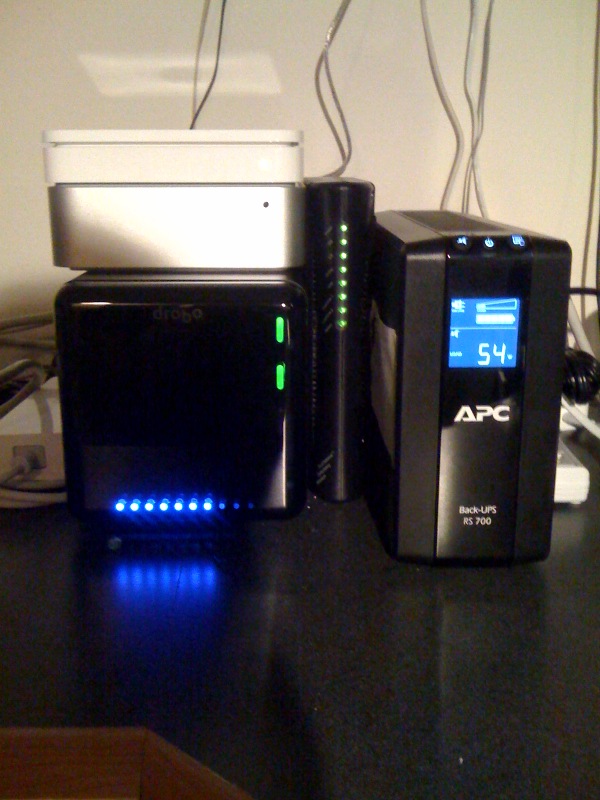 So, I moved everything around in the office, and installed the Mini, Drobo, airport, cable modem, and LCD monitor on the “backup” section of the UPS. The laser printer, my weather station base, and the cordless phone are all installed on the non-battery backup section of the UPS. See the picture to the left. You’ll notice that all that stuff on the “battery” side of things, only draws 54w. Which means I’ll get about 40 minutes of backup time with that load. Running the CPUs at full load on the mini results in 75w of draw. Still very respectable. I believe if the Drobo was fully loaded, it’s supposed to draw upwards of 40w on it’s own, but I can’t imagine that’s the case given it’s current load.
Looking at how 10.6 sees the UPS, I’m quite happy. The only odd thing is the “unknown time remaining” up on the menu bar, but if you go into the Energy Saver system preference, you can see 100% charge, and set all the settings like, power back on after outage, spin down the disks, put the display to sleep, the computer to sleep, etc. As well as telling the machine to shutdown either after any of the following:
- Being on UPS for x amount of time
- When the UPS has x amount of time remaining
- When the UPS charge is at x or below
Extremely cool. It would be cool if the UPS reported remaining runtime to the OS regularly, and maybe it does and 10.6 doesn’t know to look at it. But, it doesn’t overly matter. Just like on a laptop, you can’t see battery life remaining while you’re plugged into AC.
[xrr rating=9/10]The only problem with it is that it emits a high pitch clicking sound. I’m not sure if that will fade with time, or if it’s just a byproduct of the consumer level APCs. Searching online seems to indicate it’s not completely unheard of, but it is a bit annoying. If I ever have a problem with the UPS, I’ll certainly mentioned that issue when I go to have it serviced. But all and all, it’s a great investment, and it’s nice to have that “piece of mind” incase of a random power outage (though they’re rather rare in this area given underground power, and a reliable power company).
 <Disclaimer>I will admit, first and foremost, that this review is a bit later than I would have liked. Since the time I started wanting to review the TED 1001, the 5000 has been released that offers a few major advantages. Mainly, bang for your buck. The TED 5000 allows you to upload power data to Google Powermeter, which gives real time power graphing, much like I had to hack together on my own on my website here. With all that said, let’s get on with it.</Disclaimer>