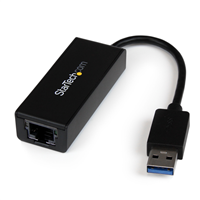
 I got a Macbook Air 11″ a few months back, and honestly, I love the thing. But one item does bug me… the lack of a network jack (wires are just faster than wireless still). Obviously I know why Apple didn’t include one: it would be thicker than the machine already is. Now, Apple makes a Thunderbolt to Gigabit Ethernet adapter, and a USB2 to 100mbit adapter, but the former is no use when you’re using an external display, and the latter is slow. So when I looked for a good option, the Startech USB3 Gigabit Adapter came up, and looked promising. USB3 has a theoretical limit of 5Gbits/sec (more than enough), and they have Mac drivers (obviously it would be nice if Apple had native drivers, but I’ll take what I can get).
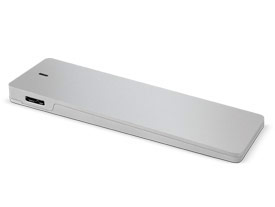
Work ordered a few, and once I got my hands on it, I thought I’d put it through it’s paces comparing it to the Thunderbolt adapter, the Apple USB2 adapter, wireless (802.11N 5ghz), and just to test USB3 throughput, a 128GB SSD in a Other World Computing Envoy (SSD came from a 2011 Macbook Air).
Network tests were performed with iperf, with the server side running on my Mac Mini Server, with the TCP window size set to 129kbyte, and an Airport Extreme (Dual Band, MB763LL/A, Mar. 2009, Firmware 7.61) as both the wireless access point, and switch). Tests were performed five times, with the top and the bottom result thrown out, and the middle three averaged. The SSD test was done with dd ((specifically dd if=/dev/zero of=/Volumes/SSD/test bs=8192 count=500000)).
| Device | Avgerage Mbit/s | |
|---|---|---|
| Startech Gigabit USB3 | 881.3 | |
| Apple 100mbit USB2 | 94.13 | |
| Apple Gigabit Thunderbolt | 932.7 | |
| 802.11N 5ghz Wireless | 149.7 | |
| OWC 128GB Envoy SSD | 1452.2 |
So, what does that really tell us? One, the thunderbolt gigabit adapter is the fastest option (which makes sense since thunderbolt is basically a PCIe interface, and very little overhead. And two, the USB3 gigabit interface is pretty quick. It’s a bit slower (about 5%) than the Thunderbolt option, but still WAY faster than Apple’s 100mbit option (~9x), and wireless (~6x) for that matter. The SSD test proved that it’s not a USB3 limitation that’s capping the gigabit adapter at less than gigabit speeds (could be the Startech drivers, or the AX88179 chipset itself). All and all, I’m not complaining. The package is small, lightweight, and it has link lights (something Apple has never been fond of, despite their extreme usefulness).
If you’ve got a Macbook Air, or a Macbook Retina, or hell, a PC laptop without a Gigabit ethernet port, but with USB3, get one. They’re only ~$35 on Amazon.
[xrr rating=5/5]