Everybody Staze...

Nobody leavz...

  • Home
  • About Me
    • LinkedIn
    • Lab
  • Contact
  • Links
  • Reviews
  • Sitemap
  • Weather

Hackintosh

2009/07/21 By staze

Last night, a friend and I “hackintosh’d” his Dell Mini 9.

• Initial Guide we used: http://gizmodo.com/5156903/how-to-hackintosh-a-dell-mini-9-into-the-ultimate-os-x-netbook (make sure to read the whole thing, including comments, there’s a bit there about the boot code if you’re using USB, it needs to be 81 and not 80).
• Here’s the guide we should have had (and found after): http://dellefi.mechdrew.com/guide/oldguide.shtml

So, friend bought a refurb Dell Mini 9 with an 8gig SSD. Sweet little machine. He’s a MCSA, so generally he’s a big Windows guy, but not blindly so. I think he mainly gravitates toward it because he knows Windows, and AD/Exchange, which is how he makes his money (he’s the AD Admin for the University).

So, hackintoshing this Dell was the goal behind him buying it. Since we didn’t have a giant USB thumb drive (8gig), or have a retail leopard disk (mine was lost long ago), I used an external USB drive, and partitioned it into two drives. One for TYPE11, and the other for the install media (which is just a dmg called “live.dmg”). You have to run syslinux to make the TYPE11 partition bootable, but that’s covered in the guide.

The main problem we encountered was, 8gig is not big enough for a 10.5.4 or 10.5.6 install. The former is over by 32meg, and the latter by 64meg. That’s with unchecking everything unnecessary. For some reason, the formatted drive is 7.2gig, the OS sees that as 6.8gig, and the installer seems to reserve 1gig for the install/swap. So, we had to hack the installer to not install some things. You’ll need xam to do that, and the file to hack is the “distribution” file that’s located in the OSInstall.mpkg, in /System/Installation/ on the Install DVD. You’ll need to make a r/w disk image in order to hack it.

First time around, we disabled installing AsianLanguages, AdditionalVoices, and iTunes. Install worked with 900meg available, but the setup after reboot never loads. Turns out, you MUST install AsianLanguages. *sigh* So, hack again, reenable that, and reinstall. 600meg available on top of install. Setup ran, and everything worked. Actually, the Mini runs great! Other than the screen being kinda vertically challenged, and the keyboard being a bit small, the speed is great (boots like a shot). SSD probably has a good deal to do with that. And, you can’t argue with the size. I checked, and it JUST fits inside my slotbar. Wish I could afford one. Maybe the rumors will turn out to be true, and Apple will release something early next year, though if it requires cell phone service with Verizon, then it’s not really an option. If that turns out to be the case, I’ll probably just buy something with my tax return next year. =)
Filed Under: Apple Tagged With: Dell Mini, Hackintosh

Weekend Project

2009/07/21 By staze

So, last weekend at the beach, I found a picture of what someone else was doing for keeping Carnivorous plants (link here about half way down the page, on the right side).

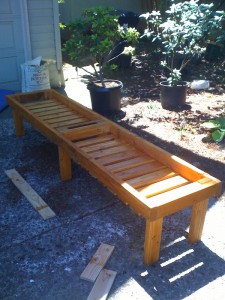
Plant bench, pre-plastic

Plant bench, pre-plastic

Based on that picture, Tara drew up a basic diagram. It required 4 2×4’s (8′), and 5 1×4’s (8′). The picture indicates one large table. I modified the idea to split it into two areas. One that will hold Bonsai, and other “normal” outdoor potted plants, and the other that will hold carnivorous plants.

Parts list is:

2-2″x4″x8′
10-2″x4″x18″
18-1″x4″x21″
2-2″x4″x10.75″

40(ish)-8×3″ deck screws (for the framing)
36-8×1.75″ deck screws (for the slats)

So, two full 2x4s, then 2 of the 2″x4″x18″ pieces create the narrow sides (interior attached, so the actual dimension is 8’x25″). Then install two more of the 2″4″18″ pieces in the center to surround the middle legs. Legs are also 2″x4″x18″, attached parallel to the the short sides, on the interior of the “box”. The two short pieces of 2″x4″ go between the outer legs to make it a rectangle area rather than a wonkey “plus”. Then just attach the slats. I think ours are about 1.25″ apart.

We then got some deck stain/sealant, since the wood is just Douglas Fir (not the best for outdoor longevity), and stained/sealed everything. Put some extra just on the bottoms of the feet. I’m thinking I might make some slices of pressure treated wood to put on the bottoms of the feet, just to be extra carpenter ant safe.

Last part will be to line one side with plastic (probably put some type of fabric under the plastic to help prevent any punctures), and staple the plastic to the top of the frame. Then run 1″x2″ around the perimeter to cover the plastic and make a nicer edge.

Our only regret at this point is not using nicer wood. If we were to do it again (which we probably will in the next few years when this one wears out, or we need more space), we’d use Cedar.

I’ll post another couple pictures when I’ve got the plastic on, and then when I’ve got it “populated”. Maybe also post a design drawing.

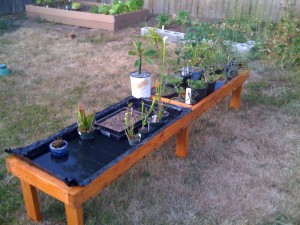
Lined and Populated

Lined and Populated

UPDATE
Here’s the “bench” with the plastic installed on one side, and plants in place. Obviously I have some room for more Carnivorous plants. My Bonsai side, however, is a bit crowded. It’ll be better once I transplant a few of them into proper pots instead of gallon nursery pots.

Only issue is there’s a small hole in the plastic, so there is a slow drip on that side. This isn’t a huge deal since carnivorous plants, by and large, don’t like to be waterlogged so much as wet. So the water level slowly dropping via evaporation and the leak are okay. I still plan to replace the plastic with non-leaking plastic (probably pond liner), but it’ll work for now.

The final task is going to be running the 1″x2″ stained and sealed “trim” around the top edge. This’ll make the whole thing look nicer, and hide the plastic on the carnivorous plant side. The whole thing does make watering a heck of a lot easier. And once the plastic no longer leaks, I figure even in the hot summer, I’ll only have to refill the carnivorous plant side once every couple days.

Only issue will be, in the winter. how I try to keep the water level down to prevent root rot. I can either elevate the plants, or I could install some type of drain. I’m liking the drain, but I’m not sure how it’ll work. Guess I post a new item when I figure that one out. For now, this post is done. =)

Filed Under: Home Ownership Tagged With: bonsai, carnivorous plants, carpentry

Short week

2009/07/19 By staze

While at the beach, I got an email from AppleCare basically saying they were closing my case because I had sent in an FYI saying things were working. They took that as a “issue resolved”. So, a few emails flew back and forth Monday, then I didn’t hear anything else. So, I sent a rather angry email Tuesday night and CC’d my Sales Engineer. That got some attention, and they reopened the case (there are other reasons too, but I NDA and all). The biggest pisser is the previous person I was working with was removed from the case, so now I’m dealing with someone else. Hopefully the miscommunication, and the rather guarded phone conversation on Friday are only due to his call being monitored… we’ll see. Anyway, they’ve said that they aren’t going to close the case until the issue is resolved in an official capacity. That was the crappy part of the week.

The better parts of the week were getting the new Xserve on Monday (I didn’t get to set it up until Wednesday). Once I got it in the rack, I can say honestly, it’s hella fast. I’ve had it running BOINC (setiathome) since Wednesday, and managed to get astropulse running on it, and it’s cranking through work units. It has 8 cores, with Hyperthreading. So, BOINC sees it as 16 cores. For some reason, it won’t use more than 8, so it’s running at 50% capacity, and still managing to blow the socks off of other machines I’ve used. It also uses less power than the older generation Xserves. It also chugs through encoding. While Handbrake doesn’t seem to take advantage of it, using MPEGStreamclip encoded an 8 minute video as H.264 in about a minute. Can’t wait until 10.6 rolls and we see GPU acceleration in Quicktime encoding.

Also got a new test server, in the form of a new Mac Mini. It’s pretty sweet for a Intel Core 2 Duo. It’s only 2.0ghz, but it seems to have Hyperthreading (VMWare sees 4 processors). I haven’t been able to get 10.5 Server Guest OS’s on it yet since we only got a Mini with 1gig of RAM. RAM should arrive tomorrow ($65 for 4gig of ram). I’m hoping to run 3 guest OS’s on there pretty regularly (one for Plone 3 development, one for Plone 2.5 testing (mirror of our current site), and one for 10.6 testing). What I did find pretty cool is that on at least Intel machines, or it may be 10.5, if you have 10.5 client installed, and put in a 10.5 server disk, you can click install, and go through the install without rebooting. After it’s installed, you run software update, it downloads the latest version of server, and then reboot. Boom, you have 10.5 server.

Last week I also finally implemented quotas on the SAN. I did this mainly because one of the LUNs on the SAN was down to about 10% free space (even though the SAN as a whole has about 40% available). This is due to the fact we only have 3 storage LUNs on the SAN. Ideally it should be even numbers. I’d love to buy new storage, but that’s about $15k we don’t really have. =/

Implementing quotas entitled a lot of steps. Since we didn’t have them enabled for the past 2 years, there were about 200 users that were over the quota I was setting. Rather than just setting them all to 4gig, and forcing them to delete work before they could function, I wrote up some scripting that would set those 200 users quotas to 1gig over what they were currently using, and then set a time limit to expire on Oct 15, 2009; at which time their quota would revert to 4gig. The script then sent out emails to those users stating what they were using, what their quota was, and that on 10/15/09, it would set down to 4gig. The more active users have already started clearing off data. I did receive an email from a user claiming they weren’t using that much… of course, I ran a `du` on their user directory, and showed that in fact, they were using that much data.

For all the other users that were under quota, I just set normal 4gig quotas. The only other thing I’m considering is to have the quotas for all those users who are over quota currently shrink down nightly so that it remains 1gig more than their current usage until it reaches 4gig. That way, they can’t delete stuff now, then fill back up the space again. But, it might be moot since they’ll be forced to be at 4gig come Oct 15th anyway.

Now, by Oct 15th, I need to have a script in place that grabs quota data from LDAP, and sets it on the SAN nightly. I also need to make sure all the LDAP quotas are set to 4gig. I’m not sure why Apple didn’t make Xsan look at LDAP for quota info (maybe a latency thing?), but it’s not that difficult to code up something that does that. Ideally, I want it to check the quotas already set, and only set those not already in place… then it won’t be writing 1600 quotas every night, but only at most, a few. I haven’t tested yet whether quotas can be set on the SAN for users that don’t have any data on the SAN… this would be nice so I could potentially set quotas before users have a chance to start writing data (then they won’t be able to go over quota). If I can implement this “diff quota”, I might be able to have the script run hourly rather than nightly. I did write a webpage where people can check their quota… I hope to improve it with a login, as well as a way to see what’s so big on their account.

That’s about all I have for the work week. It was a pretty productive week given that I was only there for 3 days, and one of the days was largely me playing with the new Xserve. Home related stuff here soon. Tara and I have been building something spiffy.

UPDATE
I am mistaken on the Hyperthreading ability of the 09 Mac Mini. It’s showing 4 processors in VMWare because I copied over the .app from a machine that did have 4 processors. I didn’t think this data would be stored in the .app, but I guess it is.

For the record, since it’s nearly impossible to find without other software, the ’09 Mac Mini 2.0ghz, has a P7350 CPU. The details of which can be found here.

You’ll also note that the P7350 does NOT support VT. So, using the Mini as a VMware or Parallels host is probably not the best idea. It’s going to be slower than using something that does support VT. I can say it works, but it doesn’t work as well as machines that do have VT. =/

Filed Under: Work Tagged With: 10.5, 10.6, AppleCare, HyperThreading, LDAP, Mac Mini, Nehalem, quotas, VMWare, Xsan, Xserve

« Previous Page
Next Page »

Weather

Categories / Archives

  • Apple
  • Coding
  • Electronics
  • Energy
  • Home Ownership
  • Miscellany
  • Politics
  • Prius
  • Sys Admin
  • Travel
  • Uncategorized
  • Work
  • June 2026
  • April 2026
  • August 2025
  • April 2025
  • January 2024
  • February 2021
  • July 2020
  • January 2020
  • April 2019
  • March 2018
  • February 2018
  • June 2017

Copyright © 2026 · Staze On Genesis Framework · WordPress · Log in