Everybody Staze...

Nobody leavz...

  • Home
  • About Me
    • LinkedIn
    • Lab
  • Contact
  • Links
  • Reviews
  • Sitemap
  • Weather

New Server…

2010/02/01 By staze

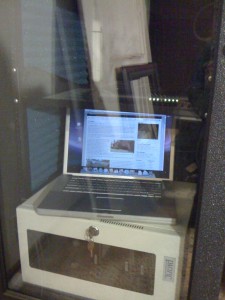
Not sure if anyone knows, but previous to now, my server hosting this site was a Powerbook G4, 1.67ghz, with 2GB of ram, and an 80GB HD.

It ran 10.5 Server, and all and all, ran it pretty well. I was using Marc Liyanage’s PHP build (http://www.entropy.ch/software/macosx/PHP/), and that worked fairly well. Though, the 5.3.0 install was kinda odd. This computer also served as my weather station machine, file server, power monitor, etc.
Anyway, it worked, but it was rather slow to do any real crunching on (like elaborate SQL queries, etc). Or for that matter, running mod_deflate on my site. And while it’s power usage was pretty low, and it had a built-in UPS (it’s battery) it wasn’t as good as it could be. Also, had to add Cardbus USB card to add additional ports, and making any kind of timelapse movies from my webcam images was out of the question. So, it worked, but it was pretty loaded (load averaged about 20-40%).

So, all that in mind, Tara and I have been selling random crap on eBay the last few weeks, and managed to build up enough between that,

and me cashing out some vacation from work, to buy a brand new Mac Mini Server (also traded in my old personal powerbook for some store credit).

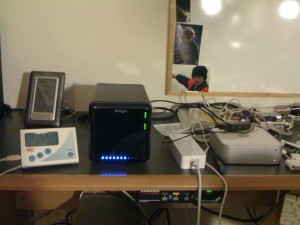
All and all, it’s sweet. It’s significantly faster, smaller, uses less power, and is more apt to be a server than an old powerbook. =) Sure, the picture to the left makes it look pretty messy (power supply, Keyspan USB-Serial adapter, serial cable from that to weather station), usb cable to webcam, usb cable to TED, firewire to Drobo), but I’m going to clean that up and put it all up on shelves above my desk. And yeah, the pictures in the background are of me as a kid.

Load average on the new system, about 2-4%. Not to mention, the RAM doubling in the new system (with the actual potential to go to 8GB at some point in the future. And being able to run 10.6 server, and I would imagine, 10.7 server as well (whenever it ships). It’s a speedy machine. I RAID1’d the two drives, so I’m not nearly as worried about a drive crashing at this point.

And since I never really talked about it, the Drobo is pretty nice as well. It’s not as fast as it could be, but that’s really not much of an issue. It’s mainly for storing media that we watch on the PS3, or laptops. So it’s doesn’t need to be a rocket, it just needs to work, and be reliable. Right now I’ve got two WD15EADS drives (1.5TB “Green” drives). They’re pretty nice, though I worry about the head parking overly aggressively. As you can see, it’s about 70% full, so I’ll probably buy another drive in the nearish future which will give me 3TB of storage. Not too bad given my homegrown only had 1TB. I’ll do more of a write up on the Drobo in the next week or two. I wanted to wait to write it up until I got the new server, as it acted kinda odd sometimes when it was hooked to the old Powerbook.

Here’s to a new week.

Filed Under: Sys Admin Tagged With: 10.6, Drobo, Mac Mini

Pruning

2010/01/23 By staze

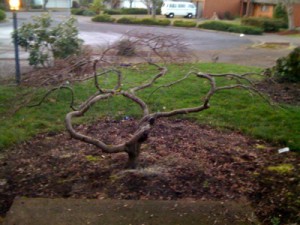
The weather today lent itself quite well to yard work, which is nice as we still hadn’t cleaned up the mess from the wind storm earlier this week. Tara started with just raking up the driveway, and we quickly moved to spraying the moss on the walk way with iron (a good, low impact, way to kill moss). Then on to pruning our maple in the front yard. Normally, pruning japanese maples should be done either right after leaf fall, or in mid-summer. But, we’re impatient, and I figure since we’re sealing the wounds, bleeding should be minimal.

We removed about 1/4 of the total foliage I would guess. But, I would say after 3 years of doing this, we now have a maple that looks presentable (at least skeleton wise). We will have to see what it looks like once it leafs out.

Leafed out Acer Palmatum, Summer 2009

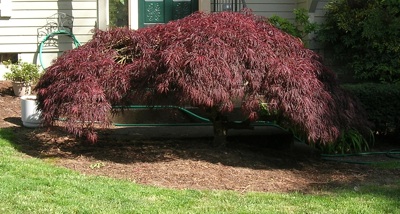
Acer palmatum dissectum, Summer 2008

You might think it looks spartan (below image), but given what it used to look like, a giant blob (gumdrop, right image), this is a huge improvement. This is more what you would expect from a japanese maple you’d see at a Japanese garden somewhere. I’m no expert, but I know the basic theory of removing crossing branches, parallel branches, branches that move directly toward or away from the viewer, and opening up the structure to allow the viewer to admire the structure of the tree. We also removed or trimmed branches to keep the leaves off the ground when it does leaf out (this was an issue last year).

Overall, the goal is to produce a tree that looks like an older, larger, more mature version of itself or similar tree.

Acer Palmatum

Acer palmatum dissectum, Winter 2010

Not sure if we succeeded, but we do believe it looks better. My only hope is that we didn’t open it up so much that we get bark scalding during the summer, but that shouldn’t be an issue since it will be leafed out enough by then, as well as the fact that it barely gets any direct sun anyway. We have Douglas fir’s that shield it from the south sun. It gets a bit of late evening sun, but that shouldn’t be an issue either.

Also pruned the Rhododendron next to the lamp post in this picture (it was rather blob-ish). This should cut down on the aphid infestations it gets during the summer. Aphids tend to dislike airflow. Also gave all the rhodie’s in the yard a spray of iron to help with chlorosis.

I’ll try to remember to post some more photos once the maple leafs out and we see how it looks. So, expect more on this in about 4-5 months. =)

Acer Palmatum

Acer palmatum dissectum, Summer 2010

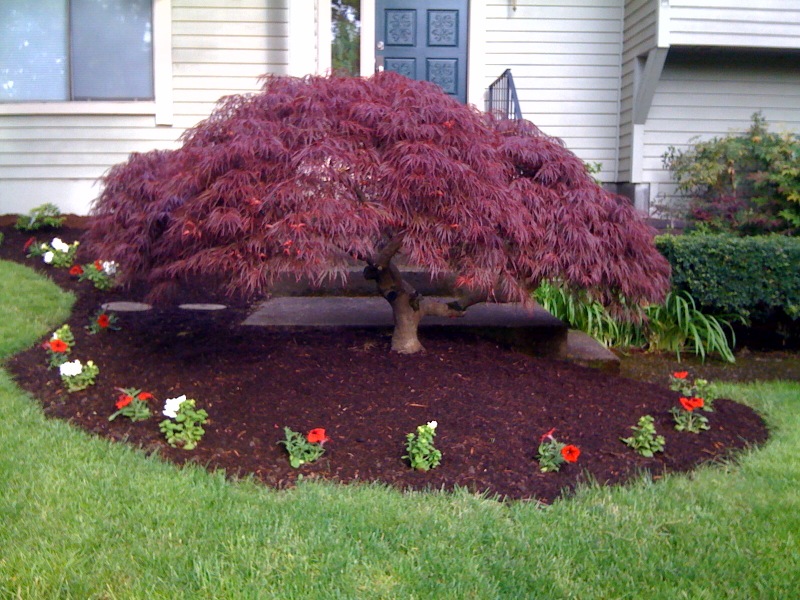
UPDATE: Here is a picture of the maple after it has leafed out. You can really see how the width has been reduced from the 2008 picture above. You can see the trunk line in the image as well as the first branch comes off at just about the perfect height (it’s a bit low, as it should be at 1/3rd of the way up the tree, but it’s not bad). While it needs a bit more refining, it’s pretty close to where I’d like it to be from now on. I also need to clean up a couple wounds on the tree. I’ll need to get some concave cutters, and hollow out the stump and seal up the wound. Hopefully I’ll take care of this during the summer. Try to get some “cut paste” to seal the wound, and make it match. There is a hole in the canopy that can’t be seen from the front that needs to fill in as well, since heavy sun on the wood of a maple like this can cause scalding, and the death of the branch. I’ve wrapped it with some trunk wrap for now, hoping that it won’t burn before the hole fills in. All and all, it’s taken 3 years to get this far, and from now on, it should just be simple maintenance. I think it should look even better once the new mulch rots a bit and turns “black”.

Filed Under: Gardening Tagged With: Acer dissectum, Acer Palmatum, Pruning, rhododendron

Apple TV Recovery

2010/01/22 By staze

UPDATE: Did have a weird issue where the AppleTV was rebooting randomly. Restoring to factory defaults again (after the 3.0.1 update), then re-updating to 3.0.1 seems to have fixed it. Will know more after the weekend.

My boss, about a year ago or more, had his HD crap out on his Apple TV. So, being ingenious, he brought it to me and I proceeded to get it back working by finding a DMG online of the boot partition that allowed it to work again. Problem was, he couldn’t run software updates on it. It would see the update, but wouldn’t let him install it. Was quite odd.

So, fast forward to today, when he finally brought it back in, and I started looking around online. Turns out, you need the recovery partition to be intact for updates to work. Not sure why, but you do.

So, after looking all around online, I did find a source for a full image of a working 2.0.2 Apple TV. If you’re familiar with torrents (and more specifically, the former major torrent site that is still around, but who knows for how long…), you can look for something called “smallatv.rar”.

So, once you have that, take a new drive (or one you’ve removed all the partitions from (you can do this via disk utility by selecting 1 partition, and then for type, select “free space”.), and do the following from terminal.

diskutil list

With that, find the drive you’re restoring. In my case, it was “disk6”.

Then:

dd if=/location/of/smallatv.dmg of=/dev/disk6 bs=1024k

That’ll take a bit, but you should now have an AppleTV drive. Problem is, the media partition is only 35GB. If you only had a 60GB drive, then you’re good. If you had bigger than that, then read on.

Now, go get a copy of AtvCloner from here: http://dynaflashtech.net/atvcloner/

Load that up, and in the first tab, point it at /dev/disk6 and hit “image source partitions”. This will take a bit, but you should end up with 3 dmg’s. An efi.dmg, a boot.dmg, and a recovery.dmg. Once you have those, quit AtvCloner, and go back into diskutil and “re-empty” the drive.

Okay, so now, go back into AtvCloner, and go to the second tab. In this tab, point it at the 3 dmg’s you just created, and if the drive is bigger than 500GB, then check the appropriate box. Then hit “Prepare New Drive”. This will take a bit, but once you’re done, you will have a functional, and full sized AppleTV drive. Drop that into your AppleTV, and boot it up.

One thing I did notice was that the downloaded image isn’t stock. It has some hack in it, since you see a Linux logo when booting. But, once you’re booted, you can go to “Update Software”, and it’ll download the latest AppleTV OS (in my case, 3.0.1), and update itself, which removes whatever hack was there.

Good luck! I really wish Apple made some stuff easier.

Filed Under: Apple Tagged With: Apple TV, AtvCloner, boot.dmg, Dead Hard Drive, efi.dmg, Recovery, recovery.dmg

« Previous Page
Next Page »

Weather

Categories / Archives

  • Apple
  • Coding
  • Electronics
  • Energy
  • Home Ownership
  • Miscellany
  • Politics
  • Prius
  • Sys Admin
  • Travel
  • Uncategorized
  • Work
  • April 2026
  • August 2025
  • April 2025
  • January 2024
  • February 2021
  • July 2020
  • January 2020
  • April 2019
  • March 2018
  • February 2018
  • June 2017
  • February 2017

Copyright © 2026 · Staze On Genesis Framework · WordPress · Log in