Everybody Staze...

Nobody leavz...

  • Home
  • About Me
    • LinkedIn
    • Lab
  • Contact
  • Links
  • Reviews
  • Sitemap
  • Weather
You are here: Home / Archives for 2009

Archives for 2009

Flash Professional CS 3, Version 9, and Network Homes (on a Mac)

2009/11/04 By staze

Or, “How I stopped worrying and realized Adobe seemingly has crappy QA” (Just because you don’t support something doesn’t mean you don’t test against it)

This is another note, but it’s mainly for those of us in the Sysadmin world. I’m posting it mainly because I couldn’t find anything myself on this.

Flash CS3, e.g. Version 9, does a bit of an odd thing when you launch it for the first time. It copies it’s configuration directory to the local user account. This is so users can tweak settings and not influence the primary copy that’s in the Application folder. The problem arises with Network Homes (which, Adobe doesn’t support). This folder is about 25MB, and contains a whopping 1100 files. Coping that many files, over the network, takes a bit of time (even on gigabit). So, when  a user first launches Flash CS3 on their account, the Flash CS3 window pops up, but there is no indication it’s doing anything. It just sits there, and begs to be “force quit”.

But, if you give it a few minutes (depending on your network and storage capacity), it’ll eventually continue loading. The bitch is that it doesn’t tell you what it’s doing.

What finally turned my onto this issue was this adobe page: Modifying the component files — Flash CS3 which shows you where those files are copied to.

Thankfully, after that initial copy, things work fine.

So, you may be saying “But, you could just mass copy out those files to the home directories”. And yeah, that’s true. Except we have 1600 user accounts. Which at 1100 files, that’s about 1.76 million files on the system, which I don’t really want to do. But it would probably work for some of you.

So, word to the wise… just wait for Flash CS3 to launch. It’ll take a bit, but it’ll work.

Over the winter break, I think I’m going to set up my NHR scripts (that I’ve modified from Jeff’s originals) to redirect that Flash folder. Sure, first launch of flash will be “slow” because it’s going to have to copy those files out each time someone launches Flash when they login, but at least it’ll get them off the network, and copying them locally is still a hell of a lot faster than copying them over the network.

UPDATE: I tried modifying the NHR scripts last week, and found that redirecting the Flash folder made very little difference, since copying 1100 files locally is still not a “fast” thing to do. So, at this point, I have removed the redirection of all the Adobe files in Application Support. Now, that first launch will be slow, but after that, Flash launches in about 10 seconds. Sure, that’s 1100 files for each user on the SAN, but at least Flash is usable.
Filed Under: Sys Admin Tagged With: Adobe, Flash, Macintosh, Network Home Directories, NHR

ServerTech CDU UPS monitoring

2009/11/02 By staze

Quick note.

UPDATE: This may actually be a coincidence as speaking with Servertech yielded the thought that it may have been the reboot more than the SSH that got it working. I cannot say for certain that I rebooted between having the CDU monitor the UPS, and enabling SSH. So, YMMV.

Just figured out that to get UPS monitoring to work on the Servertech CDUs, SSH has to be enabled on the CDU. Until that time, I saw N/A for both voltage and status before that, then once I enabled SSH and rebooted the CDU, it started working perfectly.

Not sure if I could turn it back off at this point or not, but since I have a firewall protecting the CDU, I’m not too worried about having SSH on.

Filed Under: Sys Admin

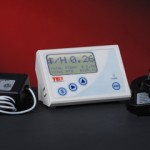
The Energy Detective (TED) 1001

2009/10/24 By staze

TED1001<Disclaimer>I will admit, first and foremost, that this review is a bit later than I would have liked. Since the time I started wanting to review the TED 1001, the 5000 has been released that offers a few major advantages. Mainly, bang for your buck. The TED 5000 allows you to upload power data to Google Powermeter, which gives real time power graphing, much like I had to hack together on my own on my website here. With all that said, let’s get on with it.</Disclaimer>

The TED 1001 is probably the first widely available whole house energy monitor device that allows someone to see how much power their home is using instantly (1 second time resolution). The display unit is accurate to 10W. Very few items in the house draw less than 10W when they’re on, so this will generally give you a pretty good idea what kind of power your home uses.

Installation of the TED is fairly simple, if not hair raising. The CTs have to be installed around the primary power feed for the breaker panel. Which, unless you have a master shutoff between the meter and the panel, or you pull the meter itself, means you’re potentially interacting with a 200AMP, 240V feed. But, you don’t actually have to touch those, and if you’re concerned, an electrician could do the job in about, 10 minutes, max. Once the CTs are installed, you hook those up to the MTU, and the MTU to a new breaker. The most difficult part of that is figuring out what phase to install the new breaker on, since it has to be the same phase as what the display is going to hook to. Which brings up basic home power…

Your home power is generally supplied by two 120V phases (why there’s the two big power feeds coming into your breaker panel). Combined, this gives us a 240V 2-phase system. If you look at a breaker panel, it kinda looks like two ladders on top of each other. One of these ladders is one 120V phase, the other is the other 120V phase. Normal breakers attach of just one of these ladders, and therefore supply 120V. Breakers for stuff like water heaters, stoves, HVAC, dryers, etc all connect to a “double pole” breaker, which connects to both ladders. So, you get 240V. So, those two phases that come into your house come from a transformer somewhere that breaks them out into single phase lines (power coming down the poles is much higher voltage, and usually 3-phase).

So, with that in mind, from breaker to breaker in your panel (going top to bottom on one side), you get alternating phases. So, when you go to plug in your MTU to a new breaker, you have to figure out what phase the outlet you plan to plug your display into is on. Otherwise, the MTU talks to the opposite phase, which goes out to the street transformer and then crosses to the other phase and comes back to the Display. Potentially hundreds of feet. This is bad. You can get a phase coupler that goes into your panel, or plugs into a dryer outlet, but it’s just easier to hook it to the right phase.

Once that’s all done, you can turn on that new breaker, and plug in the display. You should start seeing good data once you configure the TED display. It’s pretty cool all and all.

All things considered, if the 1001 was the only option from TED (assuming the 5000 was not yet released), I’d say BUY ONE! They’re a wonderful tool to figure out where and when you’re using power. If you want more specific power usage, pick up a Kill-a-Watt. You plug individual 120V items into them, and they’ll tell you how much power they’re using.

My biggest complaint about the TED 1001 is the cost of unlocking the USB port on them, $45. Thats even if you don’t use their software (which I don’t, I just use a Python script written by someone else).

[xrr rating=4.5/5]That .5 deduction is simply the cost of the unlock, mixed with how poor the software is (windows only, doesn’t help).

Here are some links of interest:

-TED 1001 Purchase : http://www.theenergydetective.com/store/teds/ted-1001.html
-Google Power Meter: http://www.google.org/powermeter/
-Energy Circle (great website about energy usage): http://www.energycircle.com/
-Youtube video showing install of TED 1001: http://www.youtube.com/watch?v=bgcvvJPX46M
-Python Script to poll TED: http://www.staze.org/static/code/scripts/ted5.py (local mirror: http://www.staze.org/static/code/scripts/ted5.py)

Filed Under: Reviews Tagged With: Energy Circle, Google PowerMeter, KWH, TED

« Previous Page
Next Page »

Weather

Categories / Archives

  • Apple
  • Coding
  • Electronics
  • Energy
  • Home Ownership
  • Miscellany
  • Politics
  • Prius
  • Sys Admin
  • Travel
  • Uncategorized
  • Work
  • April 2026
  • August 2025
  • April 2025
  • January 2024
  • February 2021
  • July 2020
  • January 2020
  • April 2019
  • March 2018
  • February 2018
  • June 2017
  • February 2017

Copyright © 2026 · Staze On Genesis Framework · WordPress · Log in