Monthly Archives: August 2009

MySQL geekout

So, I’ve spend the last week or so adding some new features to the site. Mainly for my power usage, but you’ll also notice gas usage info now.

Anywho, to do all this, I’ve been digging into MySQL, which until now I knew enough to do a "select * from table where id=x". I knew really nothing about query optimization, how to find out how long a query took, etc.

So, after some reading, I find out about “explain”. Okay, so I start looking through queries, and digging around for answers.

First, I’ll say the system MySQL is running on it a G4, 1.67ghz. 2gig of ram, and mysql’s main settings are:

skip-locking
key_buffer = 256M
max_allowed_packet = 1M
table_cache = 256
sort_buffer_size = 1M
read_buffer_size = 1M
read_rnd_buffer_size = 4M
thread_cache_size = 8
query_cache_size = 16M
myisam_sort_buffer_size = 64M
thread_concurrency = 2
skip-thread-priority

Now, I am sure these aren’t ideal… but it’s what I’ve gotten based on one of the template my.cnf files, as well as some googling.

Examples: 200k row table. Each row has 8 columns. One primary key on id, and another index on datetime.

Query 1: "select datetime,kw,temp from power where date(datetime)=20090802;"
Query takes, 0.28 seconds, returns 1440 rows. Explain tells me it’s doing a simple “where”, looking at 200k rows, but that it’s not using a key, or index. Hmm… okay.
Query 2: "select datetime,kw,temp from power where datetime >= 20090802 and datetime < date(20090802 + interval 1 day);"
Query takes, .03 seconds, returns 1440 rows. Explain tells me it’s also doing a where, but it’s using the datetime index, and only looking at 1363 rows (no idea why that’s less than 1440). Huh.

So, question. Why is MySQL not smart enough to realize that the first query should be equal to the second? Who knows… lot of people ask the question online though, why “date(datetime)” doesn’t use the “datetime” index. *shrugs*

The other issue I ran into is finding all the dates in the table, in a way that first finds years, then months for those years, then days for those months. Previously, I was doing three queries against the 200k row table, that went something like:

"select distinct year(datetime) from power;"
"select distinct month(datetime) from power where year(datetime)=$year;"
"select day(datetime) from power where month(datetime)=$month and year(datetime)=$year;"

I can hear you cringe from here. It’s horrible, but it worked. Each query obviously looked at all 200k rows, and took anywhere from .6-.8 seconds.

So, needless, all three of those took about 2-3 seconds to run, concurrently. ugh. So, what to do? I couldn’t think of a good way to speed those times up much with just the one 200k row table, so, I created another table. This table simply holds dates (in date format, as well as year, month, and day), and then daily summaries. So I can easily grab data from this table with either a full date, or just the year, month, or day. I then have indexes for date, year, month, day, and (year,month). Now, when I do the above queries (without the year(), month(), or day() functions) I get results in basically 0.00 seconds (that’s what mysql tells me anyway. So, all three running results in basically an instant set of days, months, and years. So, the archive page for power loads all but instantly now, where it used to take a couple seconds.

Back when I first switched to mysql, I figured I was going to have to do this, since it just seemed the logical way to do it. I had a table already set up, I just wasn’t populating it (I need to figure out triggers now, so maybe I can have mysql do the population on its own). And ultimately, it’s how I handled my flat file setup before. There was a “history” file, and then individual day files. *sigh* Takes figuring something out manually in order to kick someone out of being lazy. I mean, with 200k rows, it was being slow. What happens when I have a year worth of data (about 526k rows). Where, a year worth of data in this summary table is only what, 365 (so, one would expect queries to be about 1500x faster, if things worked linearly) rows?

So, that’s it. That’s what’s kept me busy the past few days. I still have some more stuff I want to add, but I’m pretty happy at this point. Things are faster, and all and all, my server shouldn’t come crashing down now when google spiders my site. =)

Have a great weekend. Hopefully I’ll post more by Sunday.

UPDATE:
Just made a change to the daily graph system. Since my work yesterday, it was not easy to get to todays power usage info, because the dateselect.php was grabbing info from the summary table, which only contained days in the past. I’ve just changed how that table is updated. Now, nightly, the previous days row is updated, and the current day is added to the table with just the date, year, month, and day. So, it’ll now show up in the dateselect. I think, now that I think about it, I’m going to add a link to the front page for todays info.

More later.

Tweet this
Posted in Coding | Comments closed

Aeropress Coffee Press

As a start to my reviews, I figure I’ll give a brief review of something I’ve owned for a year or so, but it pretty darn cool (and simple).
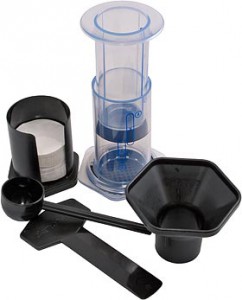
Aeropress KitThe item in question is the Aeropress, by Aerobie (yes, the people that make the frisbee type things).

So, I’m no coffee connoisseur. I don’t use an espresso machine (I own one, but it’s not very good). I have a very simple, quiet nice coffee maker (Zojirushi EC-DAC50 5 Cup) and a pretty good sub-$100 Conical Burr grinder (Breville BCG450XL). That said, however, I have drunken my share of coffee in my life. I love the smell of coffee, and the taste is pretty good when made with good beans, and a decent brewer.

But, after reading a review by Mark Frauenfelder (of boingboing.net and Make Magazine), and seeing the video of the Aeropress, I was intrigued. I went to the local nicer cooking/kitchen store, Hartwicks (a few notches up from Bed Bath & Beyond), and bought one.

Let me say this, it produces the best cup of coffee I have ever had in my life. bar none.

The process adds a bit of time to the coffee making/drinking process, but a cup can basically be made in about 90 seconds, start to finish (assuming you have an electric kettle for the water, and an automatic grinder). Basically, the process is something like this:

  1. Put about 2 cups of water in my kettle, turn it on, and set a cup out
  2. Hit the button on the grinder, and put the filter on my Aeropress
  3. About this time, my grinder stops, and I scoop (or just eyeball pour) the coffee from the grinder “catch” into the press, and then set the press on the target cup
  4. Kettle has hit about 190 at this point, so I turn it off, add the water to the plunger up to 1-2 cups (depending on the amount of grounds), and then pour that into the press
  5. Stir the water/ground mix for 10 seconds
  6. Insert the plunger, and take about 10 seconds to depress the plunger fully
  7. Remove the press, and then add enough water to make a full “cup” (basically an Americano)
  8. Enjoy!

If I do it all right, it takes around 90 seconds for a really delicious cup of coffee. And what do I mean by delicious? I mean, do you know the slightly bitter aftertaste that a cup of coffee can have? Even good coffee? Yes? Aeropress coffee doesn’t have that. At all. It is by far the smoothest coffee I’ve ever had, and lets you taste flavors in the coffee that you may never have tasted. Add to that the fact it’s only $25, and you have an amazing little gadget.

The only caveat I’ll give, is that I have not tried it with blade ground coffee. I’d imagine it would still be delicious, but may not have quite the subtle notes that burr ground coffee would have.

All that said, I can highly recommend it. It’s inexpensive, works wonderfully, and after you get the hang of it, it doesn’t take much more time than using a normal coffee pot, especially when you count adding water, a filter, rinsing the pot, adding the grounds, then waiting for the coffee maker to finish.

Other links of interest:

Tweet this
Posted in Reviews | Comments closed
  • Weather

  • Current Power Usage

  • Prius Mileage

    Lifetime Average (Calc) : 44.6MPG
    Lifetime Average (MFD) : 45.43MPG
    Total Miles Driven : 70691.9
    Graphs: Price/Gal. || Mileage || Summary
  • Distance Walked

    Distance walked in last 7 days
    12 miles (26242 steps)
    Graphs: History || Summary