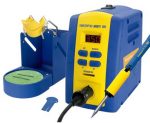
 Well, I finally did it. After years of soldering with an old Weller WTCPT, and an equally old Hakko 936, I decided to upgrade to a modern FX-951 (kit), and the Micro-soldering hand-piece (FM-2032). I’ve been doing more and more SMD work lately, on multilayer boards, and there just wasn’t the thermal capacity in my previous irons. And while the JBC stations looked appealing, they didn’t look $450 appealing. Also, the thought of finding parts, tips, etc wasn’t overly appealing. Where I know Amazon and even Fry’s stock tips for the Hakko.
I ordered the unit from tequipment.net, my usual source for this kind of thing. They offer the best education discounts, as well as one for eevblog members, and often will discount even more if you’re buying a lot of equipment. Sadly, I didn’t buy my FR-810 at the same time. I did buy the FX-951 Kit, the curved tip (T15-J02), and the Micro-Pencil curved tip for it (T30-J). Oddly, the T30-J shipped separately, but meh.
Once I had the unit, I also had purchased the T15-D08 tip at Fry’s earlier, and was able to immediately switch it it (the unit came with a conical tip, which are generally useless). The unit fit perfectly on my bench, and the feel of the iron is great. Some basic soldering tests showed it had a HUGE amount of thermal capacity. I was able to solder easily to ground planes, and thermal “pads”. Heck, I was even able to do some chassis soldering that previously required my giant Weller D650 soldering gun.
The best part of the unit, though, is swapping tips. I bought a couple extra “sleeves” when I ordered the unit so I could swap tips, and indeed, swapping them is crazy easy. Just unclip, drop into holder, and clip a tip in. The worst part, though, is the incessant “beep” when the tip is unplugged, but thankfully, you can disable that via the info in this document.
I love the iron. Much like switching to Ubiquiti for wireless, and never wanting to go back to consumer wireless, I am not sure I’ll ever go back to a consumer soldering iron. =)
[xrr rating=5/5]
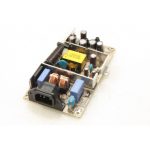 I have an ancient Dell 1800FP monitor at work that is used for a print release station (users swipe their cards, select their print job, and print it). This monitor runs 24/7, and has probably been running for next to 2 years pretty much solid. The other day, we had a power outage in the middle of the night, and when we came in the next morning and tried to turn the monitor on, it wouldn’t turn on (nothing). Knowing no other option than to try to fix it, I opened it up, and checked the voltage rails (12V and 5V). Both were pulsing on and off about once a second, and the power supply could be heard “ticking”.
 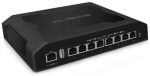 I recently purchased two listed-as-broken Ubiquiti Toughswitches off eBay for $65. They were listed as not working, unable to boot. They admitted very little troubleshooting had been done to the units, but I couldn’t pass up the price since I’d been looking for one of these switches, but they sell for more than I wanted to pay, and a friend also wanted one, so I figured I’d sell it to him if I got both working. Buying them, I figured there were two likely causes. One being a firmware corruption, and they just need to be re-flashed using their tftp mode, or two being the power supplies had failed (power surge, lightning strike, wear and tear, etc). I know from research that these switches have an internal AC/DC power supply that supplies the switch board with 48V, which I can replicate easily enough on my bench. It seems it’s not that uncommon for people to replace those internal PSUs with DC/DC converters for use in wireless installs that only have DC available, but that’s not what I’ll be dealing with here, hopefully.