Everybody Staze...

Nobody leavz...

  • Home
  • About Me
    • LinkedIn
    • Lab
  • Contact
  • Links
  • Reviews
  • Sitemap
  • Weather

Power usage with temp

2009/04/05 By staze

So, I’m now collecting outdoor temp data with my power readings… might show some additional info long term.

Anywho, here it is. On a automation note, I’m working on making this whole process of graphing much more automated. Maybe I’ll also convert the temp to centigrade so as to make the graphing easier (and show how serious I am about converting to metric!)
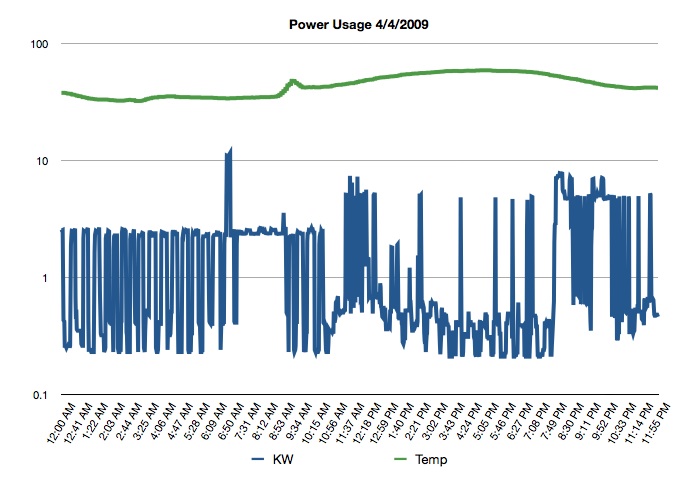
Power Usage w/ Temp, 040409

Power Usage w/ Temp, 4/4/09

Filed Under: Energy Tagged With: KWH, temperature

Power usage for 4/2/09

2009/04/03 By staze

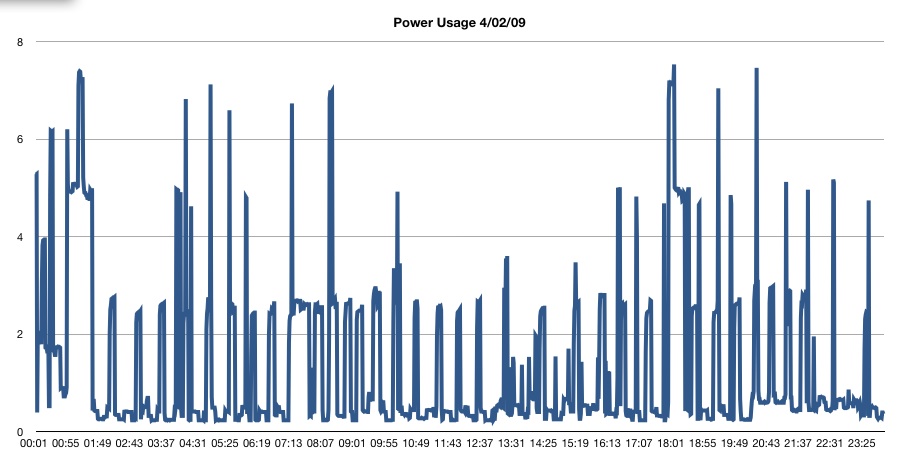
So, here’s my power usage for the 2nd of April. The smaller spikes to about 2.5KW are the heat pump. The larger hits are the water heater.

Power Usage 4/02/09

Power Usage 4/02/09

Filed Under: Energy Tagged With: heat pump, KWH, water heater

Thursday

2009/04/02 By staze


Maybe I’ll get into posting on Thursday.

So, I just added some nifty ajax to poll the power usage every 20 seconds. While the file is only updated every 60 seconds, I figure every 20 seconds is low enough bandwidth, and often enough to catch and update frequently enough. If I can figure it out, I’ll try to make this only update every minute right after the file gets updated (it gets updated about 2-3 seconds after the minute). I mainly did this for my own benefit since I wanted to be able to watch the power usage without reloading the whole page. Maybe I’ll set up an RSS script so I can subscribe to my energy usage. =P No, no twitter… seems like a waste of twitter’s bandwidth. 

I was up pretty late last night trying to fix OD replication that hasn’t worked right since my 5 hour marathon session prepping for the term. During that marathon, I demoted and re-promoted the OD Master, and apparently when I reset up the replica, it didn’t work right. Changes to passwords, or creation of user accounts weren’t getting replicated. So, I reconfigured stuff. I’m pretty convinced this is the best way to do it:

  1. Demote replica to standalone, reboot.
  2. Remove directory server from Directory Utility, if present. Reboot. If not present, go on.
  3. Check Permissions on replica, if things are clean, go to step 4. Otherwise, reboot again.
  4. Promote to replica. Once replication is complete (by watching Password Replication Log in Server Admin, or in /Library/Logs/PasswordServer/), reboot.
  5. Reboot the OD Master. 
  6. Do a test password change, account disable, something. Watch the replication log on the Master, or Replica to make sure replication takes place (You should see the replication nearly instantly if you have the master set to replicate upon any change). 
  7. Only other thing would be to add the directory info for replica SSL support, and change the slapd.plist to allow SSL. See here: http://www.afp548.com/article.php?story=20080624005724638 
  8. Optional: Reboot any systems that pointed at the Replica before you started this. There seems to be some directory caching that kept ahold of the “Incorrect Password/Invalid User” responses that the replica was returning when things weren’t working. 

That pretty much fixed it. Bitch is, it took me nearly an hour to do when I thought it would take about 15 minutes. Some of the reboots could probably be removed, but it seems safer this way. Replication now works better than it ever has I think (before, no matter what, replication seemed to happen based on a time period, rather than instantly. Easiest way to check this is to make a change to the Master in WGM or via the command line, then do a “mkpassdb -dump | grep username”. You should get back the password slot for that user, and a change date that corresponds to your change on the master. 

As always, make sure you are using NTP on all the servers/clients (ideally the same NTP server, even if it’s wrong, at least all the clients think it’s the same time), and that DNS is working (“changeip -checkhostname” is your friend). If either of these things are broken, kerberos most likely won’t work, and other things may not work right. DNS not working can cause weird issues, as can time differences (kerberos won’t work AT ALL if the times between client and server are off by more than a few minutes). Thankfully pool.ntp.org exists, as do most campuses and corporations run their own NTP servers (AD has one built in, as does ≥Mac OS 10.4 Server.)

See ya all later.

Filed Under: Energy, Sys Admin Tagged With: ajax, Open Directory

« Previous Page
Next Page »

Weather

Categories / Archives

  • Apple
  • Coding
  • Electronics
  • Energy
  • Home Ownership
  • Miscellany
  • Politics
  • Prius
  • Sys Admin
  • Travel
  • Uncategorized
  • Work
  • June 2026
  • April 2026
  • August 2025
  • April 2025
  • January 2024
  • February 2021
  • July 2020
  • January 2020
  • April 2019
  • March 2018
  • February 2018
  • June 2017

Copyright © 2026 · Staze On Genesis Framework · WordPress · Log in