So, I purchased a Lego Mindstorms NXT kit back shortly after they were released due to a wonderful “error” on Toys’R’Us’s part that allowed coupon stacking. So, I got the kit for $125, when it had just been released. And while I haven’t played with it nearly as much as I should have at this point, I have really been annoyed with how crappy the box is that it came in (the educational set comes with a case, the retail version comes in a really shoddy box).
So, after hanging new shelves in my office, and seeing that ugly box on the shelf, I decided to finally get around to finding a good storage solution for my NXT set.
First stop was google, and I found people had good luck with Plano cases, and the Stanley cases. Knowing the local hardware store had Stanley stuff on display, I drove over and picked up a Stanley 014725R, which has nice removable trays. The problem is, the NXT brick doesn’t fix in any of them. I could remove one of the large boxes, and shove the NXT in it’s spot, but this seemed hokey, so I returned the case, and started looking elsewhere.
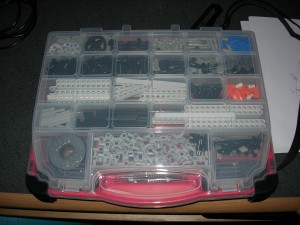
On the way home, I stopped by Fred Meyer (a supermarket chain that started here in Oregon, and has since been bought by Kroger). In their hardware department, I found the “standard” non-oem case that people use, the Plano 5231.
I knew things would fit in it because people had put up pictures of what they had managed to sort them into. After getting home, I set about organizing everything into the various slots.
All and all, it probably took about an hour to an hour and a half. And while the Plano case doesn’t have removable trays, it should be okay for a single person doing a build as opposed to a group project. If I ever start really working with the NXT set, I may pick up another one of these for my other Technic legos, as they’re currently in an ancient Lego branded, non-segregated plastic box.
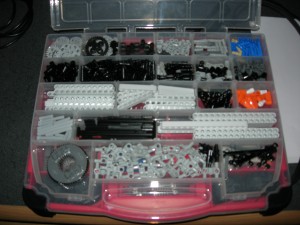 The only issue I can really see is moving back and forth between the top and the bottom of the case to get parts. Ideally, the two halves would come apart easily so one could have them on the table separately and allow for easy retrieval. I can see why Plano doesn’t do this, since the case is really meant for storing random shop related stuff, not really legos. A lot of people purchase the Stanley cases, but have two, one like the one I bought for normal parts. The other that has the deep containers to hold the NXT, cables, etc. This really allows for spreading out and building. And while that would be great for multi-person builds, or in educational settings (apparently the Lego branded cases for education even have holes in the bottom of the trays so you can wash and drain the pieces!), I don’t think it’ll be as big a deal for me. Heck, the main reason I did this, at this point, is to get the ugly torn up box off my shelf.
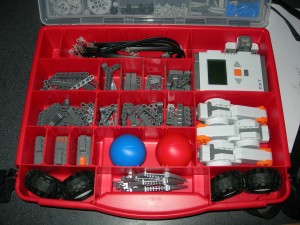 It would be cool if the bottom section had removable trays, but given the price point, and my goals, it’s hardly a deal killer. It would also be nice if the top separated from the bottom easily, in lieu of the separate containers. But, again, for $10, this is so much better than the box. I really wish Lego would have just included a case with the set.
[xrr rating=4.75/5]