 Unfortunately, my neighbors have several large Douglas Fir trees that extend out over my driveway and thoroughly cover my driveway in needles every few weeks. Since I’ve bought the house, my fix for this was to borrow a pressure washer from someone, and wash the needles/moss off every 6-10 months. This took the better part of a day, but resulted in a pretty clean, yet more damaged, driveway (the driveway is original to the house (1978) and started out as a rather rough texture even then). One thing pressure washing DID do was remove the moss that grows on my driveway since it’s such a rough texture, and the aforementioned Douglas Fir’s keep it from getting much direct sunlight. But all and all, pressure washing to remove needles is a bit overkill. Enter, the leaf blower.
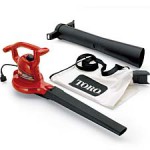
I’ll start by saying my wife was skeptical that a blower would be able to take care of the needles. But having read the Consumer Reports article on the blower vac, I was pretty confident it would work. After bringing it home, I fired it up and was immediately rewarded with needles, fir cones, twigs, and small rocks flying everywhere. I blew all the needles and everything off the driveway in less than 15 minutes, and in the end, I wasn’t covered in dirt and water. While it didn’t do anything to rid the driveway of moss, it did make the moss much more visible, and will probably aid in removal via pressure washing later (since I won’t have to deal with the fir needles as well as the moss).
I’ve since blown off the driveway again (a week later), and this time it went by very fast (5 minutes). I figure once a month will take about 10 minutes, and I should be able to greatly reduce the amount of needles tracked into my garage by the car, and into the house by people.
I haven’t tested the leaf vacuum aspect yet, but if it works half as well as the blower, I’ll be quite happy.
[xrr rating=4.75/5]