Everybody Staze...

Nobody leavz...

  • Home
  • About Me
    • LinkedIn
    • Lab
  • Contact
  • Links
  • Reviews
  • Sitemap
  • Weather
You are here: Home / 2010 / Archives for April 2010

Archives for April 2010

Archived Posts…

2010/04/16 By staze

I realized today that I had lost a good chunk of my previous work online due to several iterations of my blog that have been started, then died. So, over the weekend, I’m going to scrape the internet archive and add back those lost blog posts from years (right now I’m looking at ones from 2003) ago. Maybe I’ll even try to grab ones from before that if I can find them. =)

Not sure whether I’ll keep these articles public or not… I really need to read through them. Stay tuned.

UPDATE: I found and copied over a total of 50 entries from my previous blog(s). I’m still trying to figure out if I can easily bring over comments, but for now, there’s a whole year worth of posts that I didn’t have before (mid-2003 to mid-2004). Yay!

UPDATE 2: After reading through the posts I realized that some were a bit less kind than I would be now. So, I’ve made them all private. So, they now are mainly for posterity. I just need to figure out how to migrate the comments.

UPDATE 3: So I ended up removing all the archived posts, then going back through waybackmachine.org and building an mtimport format file (very easy syntax to grok here). I then reimported them, with all their comments, and have now re-enabled the posts. I have, however, removed all those posts from my sitemap, and told them to “noindex”. Hopefully that’ll keep bots from crawling them… maybe I’ll also add them to robots.txt to REALLY block them. Real people can go on and read them, but I’d like to prevent them from showing up in search engines. Tis all.
Filed Under: Miscellany Tagged With: archives, blog

Drobo Review

2010/04/15 By staze

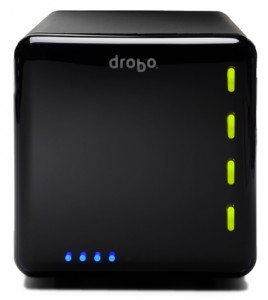
In December (on the 31st to be exact), I purchased a Drobo for myself to replace a home grown RAID I’d been using for years. The original RAID was a big SCSI enclosure that was built to hold 8 5.25″ drives, with a locking front. I had purchased a FW800 bridgeboard that supported 4 PATA (IDE) drives and was using 3 drives in JBOD. Gave me about 1TB of storage (2 300GB drives, and a 400GB drive). Overall, it worked well, but it was approaching 5 years old, and there was no redundancy at all with the data. And while none of the data was critical, it would have sucked had a lost it.

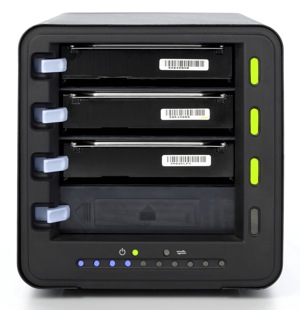
So, after much research, and a lot of doubting, I bit the bullet, and purchased a standard Drobo Gen 2 (FW800, and USB2 connectivity. Holds 4 3.5″ SATA drives). I couldn’t justify the price increase it would have cost to buy the Drobo S.

Along with the Drobo, I purchased 2 1.5TB WD “Green” drives. They’re 5900rpm drives, but they didn’t need to be really speedy since I wasn’t using them as primary storage for anything. They basically host movies and music for use around the house.

Once I received the Drobo, I popped the two drives in, and hooked it up to my server. Within a few minutes, everything was online, and it was up and working. At the time, my “server” was an old Powerbook G4, which seemed to have a flakey FW800 port (was seeing errors occasionally in the system.log with the FW800 cable supplied with the Drobo). Thinking it was the cable, I switched to a FW800 cable I had that had ferrites on both ends. This eliminated the errors (I have since tested the cable that came with the Drobo, and it works fine… just seems the FW800 port on the Powerbook was overly susceptible to EMI). I copied everything from my old enclosure to the Drobo, and it’s been working great since.

The unit is silent when the fan isn’t running. And when it is running, it’s not very loud at all (it’s a 120mm fan in the back). It seems to run during heavy access, and most likely is tied to the SMART temps reported by the drives. I’m sure if I had 4 drives installed, the fan would run more often, but the drives never heat up (touching the front of them with a knuckle never has them feel anything but room temp). But, as I said, I’m never heavily using them (not using them as video swap, or anything like that).

How does it perform?

Bonnie++ Results:

server.example.com 8G,,,26859,5,16138,2,,,42881,3,63.9,0,16,2302,18,+++++,+++,
2004,11,113,0,+++++,+++,48,0

So, I get about 27MB/sec write, and 43MB/sec read. And about 64 iops. While not great (the internal drives on my server get 59MB/sec write, and 110MB/sec read, and 212 iops), it again, isn’t about mass speed with this. I basically use it to server media to machines around the house.

So what does this all mean? It means if you’re looking for a fast, high performance external RAID array, you should probably look more at something like the Promise NS4600, which does a real RAID5, or RAID10. 4 2TB drives, and you’d have a pretty sweet array that could be used for FCP scratch when doing HD video. But, the Drobo will work perfectly fine with these numbers for SD video (which is 25mbs, or about 3MB/sec).

I really like the Drobo. It works great, and I like the fact that in the next couple months, when it fills up, I can just buy another drive, plop it in, and I’ll suddenly have more space (space is calculated as the combined storage of all drives installed, minus the size of the largest drive). So, if I buy another 1.5TB, I’d get another 1.5TB. If I bought a 2TB, I’d only gain 1.5TB (because the 2TB would then become the “redundancy” drive).

Add to that the fact that I haven’t had to deal with the Drobo AT ALL since I set it up, and we have something that’s really quite serviceable, and extremely useful. I deal with IT related stuff every day, and I don’t really want to come home to my array having failed, and struggle to get it back online. Now, it could be the Drobo fails at some point, and because of it’s proprietary format, I can’t get it back online without the help of Drobo support, but, so far, it couldn’t be simpler.

The only downside that I can see, is when you format the array, you say how big it should be. This allows for future expansion of the volume. In my case, I told it to be 16TB (so I could expand it as much as possible). But, the OS always sees it as 16TB. I would think it would be possible for the Drobo software to override this size, and give the OS a real size. But, maybe at some point that will happen.

[xrr rating=9/10] It’s a solid product, and it’s well worth the money simply for it’s simplicity, functionality, and diversity.

Links:
Drobo: http://www.drobo.com/products/drobo.php
Bonnie++ : http://www.coker.com.au/bonnie++/

Filed Under: Reviews Tagged With: bonnie++, Drobo

NTP in 10.6 with IPv6

2010/04/14 By staze

This week, I discovered a bug with NTP in 10.6 that was preventing NTP from syncing on my servers at work. So, their times were all over the place. The worst being about 5 minutes off from another (one was 2 minutes fast, the other was 3 minutes slow). While I don’t use Kerberos, this time difference could have been enough for things to get out of wack.

So, what was the bug? Basically, ntp doesn’t pay attention to whether IPv6 is available or not, and if AAAA records are available for the NTP server you’re using, and IPv6 is disabled, NTP will fail, and never sync. So, let me explain a bit more.

First, get a 10.6 box up and going, on a network that supports IPv6. This might be a bit of a problem for some, but…
Next, disable IPv6 on the 10.6 box.
Now, try something like an ntptrace against an NTP server that has both IPv4 and IPv6 information in DNS.

Watch ntptrace die with:

ntpq: connect: No route to host
ntpq -n -c rv ntp.example.com failed at /usr/sbin/ntptrace line 39.

So now, try an ntptrace against the IPv4 address that ntp.example.com resolves to. Works doesn’t it! Next, try ntptrace against a NTP server that doesn’t have an AAAA record. It also works.

I reported this bug to Apple as 7858336, and within a couple hours, I got back a response saying it was a duplicate of 6736177. So, I’m not the first to find this issue. My hope is that it’s a bug with ntptools only, and not something larger (like the whole dns resolution system). But, I haven’t found anything else that exhibits this problem.

So, for now, I’ve changed my NTP settings to hit against a “hidden” ntp server on campus that doesn’t have an AAAA record. Hopefully this issue will be resolved with 10.6.4, because this certainly is an issue for organizations that are trying to be IPv6 friendly.

As for the question of why I’ve got IPv6 disabled? It traditionally hasn’t gotten along with Xsan. So, it’s off. Simple as that.

Oh, and it seems time.apple.com (the default NTP server for 10.6 (that at least 10.5 before that) systems) doesn’t have any IPv6 info, so it works just fine.

Double “oh”… if you don’t know how to check to see if your time server has an AAAA record, just do this in terminal:

`dig aaaa ntp.example.com` (where ntp.example.com is the server in question).

Good luck, and let’s all hope Apple gets this fixed.

Filed Under: Sys Admin Tagged With: 10.6, AAAA, IPv4, IPv6, NTP

« Previous Page
Next Page »

Weather

Categories / Archives

  • Apple
  • Coding
  • Electronics
  • Energy
  • Home Ownership
  • Miscellany
  • Politics
  • Prius
  • Sys Admin
  • Travel
  • Uncategorized
  • Work
  • April 2026
  • August 2025
  • April 2025
  • January 2024
  • February 2021
  • July 2020
  • January 2020
  • April 2019
  • March 2018
  • February 2018
  • June 2017
  • February 2017

Copyright © 2026 · Staze On Genesis Framework · WordPress · Log in