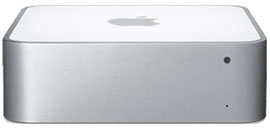
 In late January, I was able to upgrade my server to a Mac Mini Server. This is a pretty sweet little box. 2 500GB HDs, 4GB of ram, Intel C2D 2.53ghz. No optical drive, but that’s fine with me, since you can use remote drive, or purchase one of the USB optical drives for the MacBook Air.
Initial setup was quite easy, once I found a copy of “Remote Install” to run on my PowerMac G5. This utility is basically “NetBoot” in an extremely simple interface. It allows the Mini Server to netboot the install DVD. I then changed the HDs to be in a RAID1, and installed 10.6. That took a bit, but other than that, it was quite painless.
bonnie++ reports look like:
/usr/local/sbin/bonnie++ -d / -s 8G -u root:wheel -qfb
server.example.com,8G,,,58807,12,27984,5,,,110101,8,212.3,0,16,12352,59,+++++,+++,
8137,47,543,5,+++++,+++,231,3
Which, isn’t bad at all for dual 5200rpm drives. The machine shipped with two Hitachi HTS545050B9SA02.
Upgrading from the previous server (a Powerbook G4, 1.67ghz, 2GB of RAM, and a single 80GB HD) to this new machine was, to put it simply, breathtaking. The average load on this new machine is consistently less than 0.05, yet on the old PB, it was often upwards of 0.50. So, by that regard, about 10x the performance (realistically, probably more like 6-8x as fast). =) Also, there is a noticeable improvement in performance of the Drobo. I’m pretty sure the FW800 port on the Powerbook is flakey. Added bonus is the 64-bit nature of the new machine… which is really quite nice (really the main time I’ve encountered it is playing with bigint’s in PHP). Also means I can upgrade the ram to 8GB when the prices come down on DDR3 SO-DIMMs.
Add to that the fact that I can now run 10.6, and am not suck with the PPC OS’s, it’s great.
The only thing Apple could have done better? Remove the Mini-DVI port and add a second gig-E port. If they did that, I could probably start using these things at work rather than Xserves. =) Especially if I had an iSCSI SAN.
The machine is very quite. I can only hear the HD’s access occasionally. The fan is near silent. The Mini really is one of the greatest computers Apple has ever designed/made. Other than the dumb single RAM slot the PPC mini’s had, they all have been great machines. I still have a 1st Generation Mac Mini running strong (1.25ghz G4, 1GB RAM, single 80GB HD, 10.5.8 client) at work (it runs Intermapper to monitor various devices around the building. Works great).
Only changes would be the second gig-E port, and it would be sweet if you could buy without the OS (if this was for work, I wouldn’t need even MORE copies of 10.6 (already have spares)). I’d give it a full 10, but I can’t think of anything that’s perfect. =)
[xrr rating=9/10]
If you have any questions, please feel free to leave a comment.
*Image lifted from Apple website.