Everybody Staze...

Nobody leavz...

  • Home
  • About Me
    • LinkedIn
    • Lab
  • Contact
  • Links
  • Reviews
  • Sitemap
  • Weather

MJSI Hydroright and Hydroclean HC660

2010/08/09 By staze

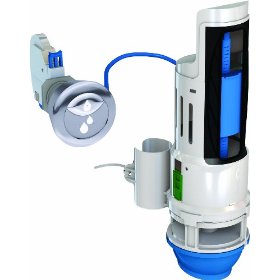
HydroRight-MJSI HYR270

Visiting Costco last week, I was looking at a Dual Flush toilet they had on sale there for $140. I didn’t overly like the look of it, and wondered about the quality (I really prefer Toto toilets), so went on my way. However, hidden in another section of the store, they had a big pallet of Dual Flush conversion kits for $20. The kit they have is this one, the HydroRight. It’s “tool-less” to install, and looked like it was built well.

A purchase later, and a drive home, and I started the install. Seemed easy enough, but after finishing, I noticed the toilet was tripping from the tank into the bowl. Annoying dripping sound. So, I took the kit all out, and went about trying to get it to now leak.

The instructions are pretty clear, but I think they leave a diagnostic out. The easiest way to test for leaks is to basically install the base of the unit, and leave the valve part off. Then use something to fill the tank up to the top of the base, and mark the water level. Wait a bit, and check the level. I went so far as to dry the inside of the valve housing out so I could see if it was leaking. It took 4 tries installing it, but I finally got it. The key is, less is more, and use the rubber o-ring.

So, first, put in the base, and use the cam adjuster if needed. Then, put the o-ring down the overflow tube and make sure it’s making contact with the top of the base that slides around the overflow tube. Now, LIGHTLY (like, two fingers on the valve base, and one on the o-ring) press on the o-ring, and the base, and tighten the zip-tie. Then, put some water in the tank, and check for leaks.

After about half an hour to an hour, check the water level, and if it’s good, you should be able to install the rest of the valve. All and all, it works great. The half-flush does great, and the full is the same as the previous full-flush, which was great.

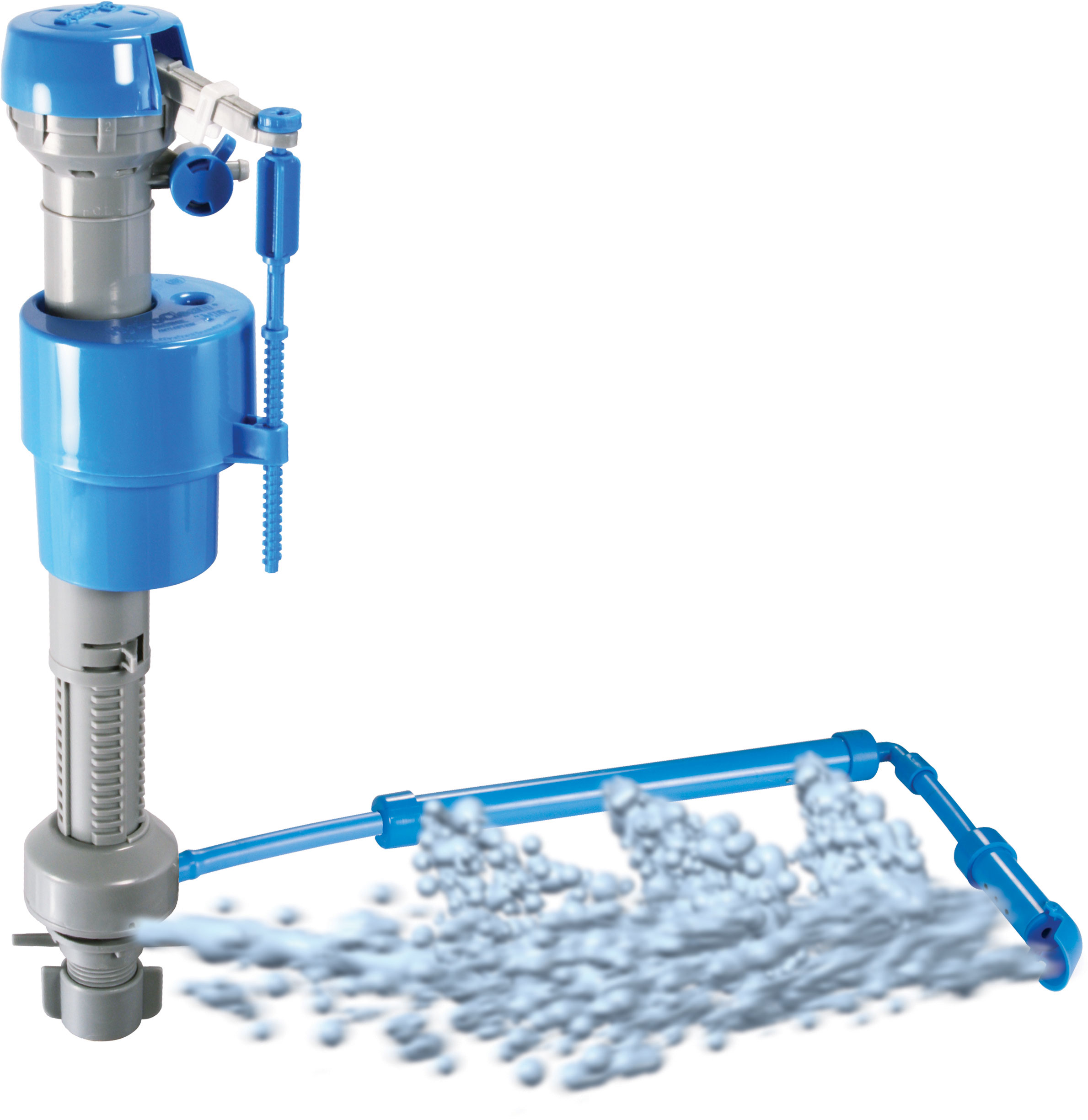
HydroClean-MJSI HC660

After that was done, I decided to really pimp my toilet out. After looking at the site for the HydroRight, I saw they offer a new fill valve that is easily adjustable, fills faster, and cleans out the tank in the process (oh, and allows adjusting the amount of water sent into the bowl, which saves water). The valve in question is this one. It was $10 at a local TrueValue. I brought it home, and installed it in maybe 10 minutes, max. It is, quite honestly, extremely cool. It really makes me realize the person that designed it must have been a plumber. The nut that tightens it onto the tank is designed to click when it’s tight, and the wings you use to tighten it have wings that will bend before you crack the tank. Biggest issue people have with toilets are installing them and cracking the tank or the bowl due to bolt/nut over tightening.

The valve also has a nice feature that cleans the tank when it’s filling it. While my tank wasn’t dirty by any stretch, it wasn’t clean. After a couple flushes with this valve, it’s now pretty good looking.

[xrr rating=8.5/10 label=”Dual Flush Conversion Kit:”] I’d give the dual flush conversion kit a higher score except its trickiness of install. The instructions were clear, but they might have been a bit better. The cam adjuster seemed, not intuitive. But still, great product.

[xrr rating=9.5/10 label=”Fill Valve:”] Perfect scores are impossible in my mind, but honestly, I don’t see any problem at all with this fill valve, and it may be the best single toilet “upgrade” you could buy. Even for a brand new one.

I’m not a plumber, but I would highly recommend either/both of these items to anyone who has a 5/3.5/1.6 gallon per flush toilet. They’ll save you money, and more importantly, they’ll save water.

Filed Under: Reviews Tagged With: Costco, HydroClean, HydroRight, MJSI

Canonical URLs

2010/07/29 By staze

At work, we’re looking at a major webpage redesign, and are therefore looking at other similar programs and their websites to see what they are using… and one major thing has struck me in the process. No one uses redirects to force certain URLs. For example: http://www.staze.org vs http://staze.org. Now, in one case, both work, and they present the same content (bad for SEO), in the WORST case, one works, and the other doesn’t. Almost none of the sites we looked at handled this correctly.

Really, it’s extremely easy to fix. Either in .htaccess, or in your virtual host file, just add something like:

RewriteEngine On
RewriteCond %{HTTP_HOST} ^localhost [OR]
RewriteCond %{HTTP_HOST} ^127\.0\.0\.1
RewriteRule ^(.*) – [L]
RewriteCond %{HTTP_HOST} !^www\.example\.com
RewriteRule ^/(.*) http://www.example.com/$1 [R=301,L]

UPDATE: Please see the corrected code above to account for anything referencing your site on the local machine via localhost, or 127.0.0.1…. some of my site broke without me noticing until today. DOH!

[Read more…]

Filed Under: Sys Admin Tagged With: Canonical, mod_rewrite, URL

Hardware UUID “Attribute Not Mapped”

2010/07/28 By staze

Since I have been pouring over OD the last few days, I decided to look again at a change in WGM that came with 10.5. Computer records now have a place for Hardware UUID. UUIDs offer a theoretically truly unique identifier as opposed to MAC address, which I’ve seen not be unique (mind you, this was a manufacturing defect that happened when I was working at 3com, where some customers were getting boxes of NICs all with the same MAC address). Trying to populate it, however, results (for me) in a “Attribute not mapped” error, saying I should contact the sys admin. So, self… this doesn’t work.

A quick search around resulted in a Apple mailing list discussion list thread that talks about this very issue. It seems the 10.6 update added these attributes to the schema, but didn’t map them to anything. Cool.

So, here’s the scoop. Open up Directory Utility on the OD Master in /System/Library/CoreServices, then unlock. Open up LDAPv3, then click on 127.0.0.1, then Edit. Now “Search & Mappings”, and scroll down on the left to “Computers”. Open that up, then click “Add”. You should see the option to add “HardwareUUID”. Select and Click “Okay”. Now with that new one selected, on the right, type in “apple-hwuuid”. Now “Write to Server” and authenticate. Hit Okay. Now you should notice that “LDAP Mappings” is set to “Custom” or “From Server”. You should be able to change that back to “Open Directory Server” and click “Okay”.

HardwareUUID in WGM should now work. Have Fun!

Filed Under: Sys Admin Tagged With: Mac OS X, Open Directory, UUID

« Previous Page
Next Page »

Weather

Categories / Archives

  • Apple
  • Coding
  • Electronics
  • Energy
  • Home Ownership
  • Miscellany
  • Politics
  • Prius
  • Sys Admin
  • Travel
  • Uncategorized
  • Work
  • April 2026
  • August 2025
  • April 2025
  • January 2024
  • February 2021
  • July 2020
  • January 2020
  • April 2019
  • March 2018
  • February 2018
  • June 2017
  • February 2017

Copyright © 2026 · Staze On Genesis Framework · WordPress · Log in