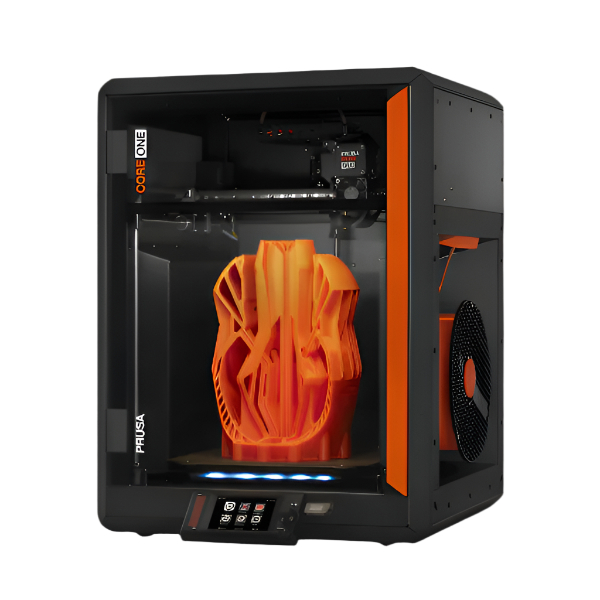
I’ve owned a few 3d printers over the years. I started with a little Fabrikator Mini, then moved to a Cetus3D, then a Cetus2. The move from the Mini to the Cetus3D was fine, but had issues. I didn’t learn from that and ended up kickstarting the Cetus2, which was not great. Finally I was like “I’ve had it with these unsupported printers and companies, let’s buy a real printer”. I first was looking at a Bambu Lab A1 Mini, then the A1. They definitely looked appealing, but I’d seen some stories that made me wonder if they were going to do a Tiertime (let people buy the printer, then not offer support in the long run). Talking to a coworker, they said I should look at the X1 Carbon, which I said “I can’t afford” but then realized maybe I could. At that point, I thought “if I can afford an X1, maybe I can afford a Prusa…”. I knew the CORE One had been recently released, and I knew from years of following Prusa had offered years of “Upgrade your current printer to the new version” kits. Something I knew Bambu or others wouldn’t ever offer. So, realizing all that, and seeing the kit for the CORE One was available, I went ahead and ordered a Prusa CORE One kit back in February (2025). I thought mistakenly I’d have the printer quickly, but no, the kit didn’t show up until late May (which is good, honestly, as I was saved from the worst of the tariffs from the EU (which ended up being close to $140 invoice from Fedex a few weeks later that was the tariff as well as Fedex charges).
The kit arrived in a single (heavy) box. About 60lbs. I promptly put the box in the livingroom and waited for the family to take a trip out of town for a few days. While the instructions say you need like a 6ft by 6ft area to build the printer, that does not include space you’ll want to unbox, and have parts ready for retrieval. In total there were like 10 boxes in the main box, plus the larger metal parts. MANY screws, and larger bits. I largely had the entire living room and dining room (I was building on a towel on the dining room table) full of boxes, parts, etc. I suppose if you had help, or wanted to be super detailed, you could unbox everything, lay it all out, put screws in cups, etc.
The instructions are very good, and required very few instances of reviewing other comments. I spent a little over 2 days, probably a total of 10-12 hours, building the printer. While it IS quite heavy, it’s VERY solid, and the use of the side to store filament is very useful to the space I have available for a 3d printer in my office. The build was not challenging at all, and really just felt like a big lego set. Prusa Slice is also worlds better than Tiertime’s (the maker of the Cetus3D and Cetus2) software.
First of all, this thing is fast. Real fast. It’s the first Core XY printer I’d used (this means the print bed doesn’t move back and forth, it just moves up and down). This allows them to print faster because the printed object isn’t being flung back and forth with the bed. The speed limit is really the speed the head can move around. Wifi works well (I haven’t tried ethernet), and the camera for it also works pretty well (it’s not real time (it is now, but only on the local network), but works fine for monitoring). I mainly still only print PLA because it’s “easy”. I do need to try PETG. This is also the first time I’ve used a printer with a removable print sheet. I had no idea what I was missing. No more prying the print off the bed, scrubbing the glass, or replacing the painters tape/glue stick.
Most importantly, I don’t feel like I’m out in the cold with the printer. While I didn’t have issues with VFA’s (Vertical Fine Artifacts), I did have an issue with the printer “crashing” (resetting) while doing fast diagonal moves. Others had similar issues, and came to the conclusion it was poor grounding of the X-Y stepper motors. So, I took the printer down to the ground, unscrewed one screw on each of those steppers, used a drill bit to scrape the powder coat off the XY gantry where the screw head sits, then put the screw back in. Crashing issue gone.
The only printable mod I’ve done so far are some squash ball feet. The stock stick-on rubber feet are not good. They fell off immediately after I built the printer, then even after re-securing with new adhesive they fell off again.
Overall, would very much recommend this printer or the kit. Anymore given tariffs, I might suggest buying from Printed Solid if you can. It’s more expensive, and really is just putting the tariff cost into the price of the purchase, but at least you don’t have to play the stupid game “what are the tariff’s going to be today?” “game”.

Leave a Reply