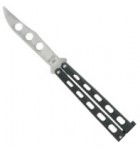
 For years I’ve had a passing interest in “flipping” or playing with a balisong/butterfly knife. Living in Oregon all my life, I was well aware of Benchmade and their extremely high quality Balisongs. Alas, they’re also quite expensive, and they don’t make a trainer anymore. =(
So, a few months ago I started looking at trainers, and how they ranked. From most of what I saw, the Bear and Son BC114 got pretty good reviews, and was darn affordable. So, a few weeks back, I purchased one off eBay, and waited.
When the “knife” arrived, I was pretty pleased. The build quality seemed good, though the punch job on the “blade” was a bit sloppy (the tang side had obvious punch press slop. nothing my Dremel couldn’t fix). The play on the handles was non-existant (and still is, but I’d imagine that’ll change as the pins stretch), but the pins also seemed overly tight. Thankfully, some White Lightning fixed that as well.
Now, I’ll be the first to admit, I suck at flipping. But that’s the point of the trainer. And I have gotten better. Now, I don’t know how long the knife will last, but given the parts, I’d guess I should be able to “fix” anything that breaks. The “blade” should last forever. The pins may break, but I should be able to replace them with screws. The handles I’d guess I’d just try to fix with some JB Weld.
All and all, pretty happy. I wish I could have bought it locally, but when I went to the local knife chain store (Excalibur Cutlery and Gifts) they were sold out (and a bit expensive, but I’m all for local economy).
[xrr rating=4/5]
 Google introduced their Print Preview functionality back in the Chrome 15 days, and until Chrome 20 or so, you could go into “about:flags” and turn it off. In Chrome 20 or so, they took that option away. Now all the threads online are full of “just use the “Command-Option-P” crap ((Google seems to think Adobe had the right idea when they created their own Print dialog, when in fact, it’s really stupid. Augment the dialog, don’t replace it with something completely different than every other app)). While I rarely print, I do frequently “Save as PDF”, and I find the process, and output much easier/better using the system dialog.