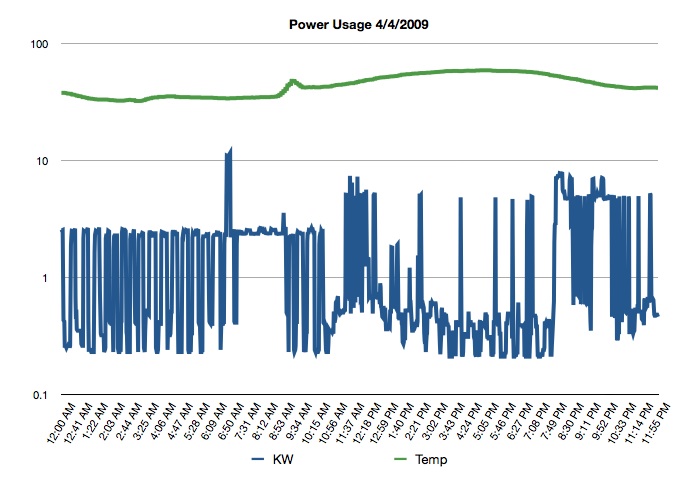
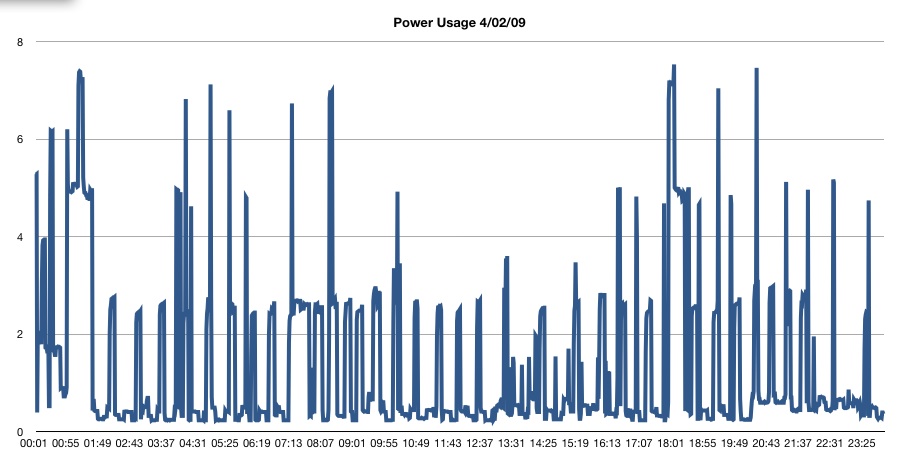
So, I’ve been asked by a friend on facebook about jpgraph and my home energy use. Here’s kind of a “here’s how I did it” and an example.
Back a few weeks ago, I purchased a TED for my home. The Energy Detective has a piece that installs in my electrical panel around my main power feed (both phases), and then reads total load on my panel. It then sends that information over household wiring to the receiver in my office. It gets new info every second. It’s accurate to about 10W.
Okay, so every minute, my home server polls the TED, gets current KW use, and total KHW for the day, and writes that to a file along with date and time. Also, it grabs the current outdoor temp from my weather station and writes that to the same file. I don’t grab indoor temp because the weather station console is mounted somewhat close to the output of my server rack, so it pretty much constantly reads 68F (though, that is what I keep my house at).
Then the question is, what to do with this data? I have been messing with it in Numbers.app, but it’s slow dealing with 1400 rows of data (60 * 24 data points). And I hate excel. Plus, I’d like to make it automated. So looking around online, I found a few php suites that’ll do graphing. One uses google’s graphing API, but it’s kinda broken in that if you try to pass it 1400 data points, it breaks. =P This seems to be a problem with the google API because they’re all pushed as a HTTP GET. =/ Out of all of them, the best seemed to be jpgraph. It uses GD (which meant I had to install a copy of PHP on my server that was actually complied with GD support (thanks Apple for giving us semi-crippled software, again) (see my links for a link to the PHP install). Once that was going, I read up on jpgraph, and looked at the examples. They seem pretty cut and dry, so I pasted in a bunch of data, and lo-and-behold, it works! So, now I need to make it dynamic (you pass it a date, and it parses the energy use for that date). I got that done yesterday.
So now, you can go: http://www.staze.org/powergraph.php?date=20090407, and see a nifty graph of my power usage on the 7th of April, 2009, as well as the temperature for that time. I still need to make a page that acts as a kind of interface for this. Something that lists available dates, links to the graph, etc. I also hope to allow easy graphing of whole months, years, etc. But, that’ll take some time.
All this really came about because I’ve been graphing and tracking my energy use on a monthly basis by inputting the data off my Utility bills. Now I just have more granularity!
So, things left to do with this project are: Make an interface, get monthly graphing working (it would be a daily granularity) with average temp for that day graphed, and work out a long term file structure for the data. Right now it’s all just sitting in a directory that every night, a cronjob takes the previous day, grabs the total KWH use, and logs that and the date to a monthly file, then compresses the daily log (speaking of which, who knew there was a gzfile operator in PHP!?!)). Um, maybe change the image format from PNG to jpg, and probably make it so the image wasn’t necessarily recreated every time (check to see if it exists, and if it does, serve that up, if not, create it, and save it for next time). While I don’t see my energy logs getting a lot of traffic, it’s just good coding.
All of this REALLY makes me want to get a 3PH equivalent for work, so we can watch energy usage in the building. But, that’ll have to wait. =P
Oh, and let me know if you want raw data… I can post some. I’m also more than happy to post my PHP that’s parsing and graphing, as well as post my scripts that log the data, or the ajax I use to update the sidebar (though, those last ones you can get by viewing my page source).
Links:
jpgraph: http://jpgraph.net/
Real PHP install file: http://www.entropy.ch/software/macosx/php/
TED: http://www.theenergydetective.com/index.html
Python script that I based by query off of: http://www.staze.org/static/code/scripts/ted5.py (local mirror: http://www.staze.org/static/code/scripts/ted5.py)